Line25

10 HTML Tag Crimes You Really Shouldn’t Commit

Read the full post

You better watch out, because the HTML police are about. They scour your code and pick out the most unspeakable crimes against HTML markup. This handy list of ten HTML tag crimes sheds some light on some of the most common coding mistakes and helps provide an alternate solution. Tips include writing valid markup, making semantic choices, avoiding deprecated tags and more!

Crime 1: Placing Block Elements Inside Inline Elements
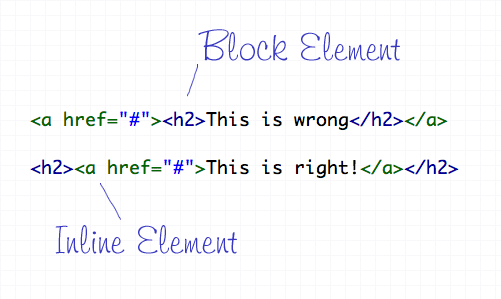
HTML elements can either be displayed in two ways, Block or Inline. Each tag by default is naturally either a block or inline element. Block elements include divs and paragraphs, that make up the structure of the document. Inline elements on the other hand should sit inside block elements and go with the flow of the document, examples include anchors and span tags. With this in mind, inline elements should always go inside block elements, and never the other way around.

Crime 2: Not Including an ALT Attribute on Images
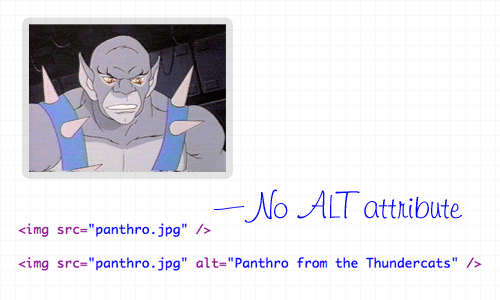
The ALT attribute is a required element on all images displayed on a web page. It helps users determine what the image is, should they be browsing on a screen reader, or simply on a slow connection. The ALT attribute should describe the image being shown, so an alt=”image” is bad practice. If the image is purely for decorative purposes, simply add an empty alt attribute, such as alt=”".

Crime 3: Not Using Lists When Necessary
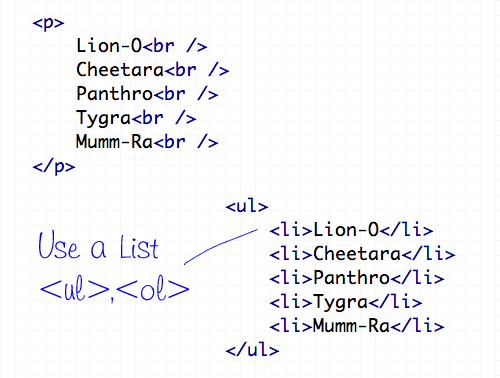
The handy UL (and OL) tags have a bunch of uses and are extremely versatile for the display of all kinds of page items. Unsurprisingly the Unordered List tag does a great job of displaying a list of information, so don’t even think about using a bunch of line breaks ever again!

Crime 4: Using <b> and <i> for Bolding and Italicizing
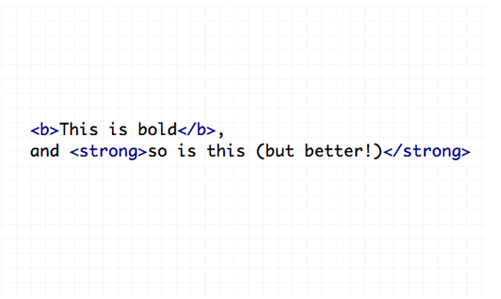
The <b> and <i> tags make the text appear bold and italic respectively, but semantically they are classed as presentational tags, therefore the effect would be best replicated with the CSS styles of font-weight and font-style. If the passage of text suggests areas of importance, they should be highlighted with the <strong> or <em> tags, which basically do the same job as <b> and <i>, but also make the world a nicer place.

Crime 5: Using Too Many Line Breaks
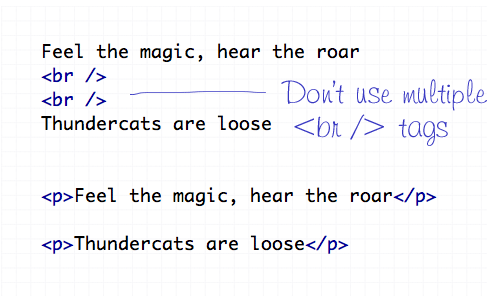
The line break tag of <br /> should only be used to insert is single line breaks in the flow of paragraph text to knock a particularly word down onto a new line. It shouldn’t be used to make gaps between elements, instead, split the text into separate paragraphs, or adjust the margin styled by CSS.

Crime 6: Using The Wrong Strikethrough Tags
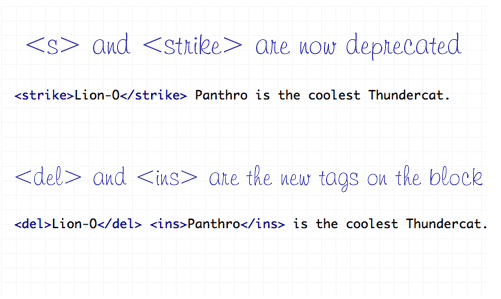
In the olden days, <s> and <strike> were around to allow edits and amends to web text. However they are now classed as deprecated tags, which means they still work fine (in Transitional), but there’s a set of new tags on the block – <del> and <ins>. These new tags are used together to show deleted, and the subsequently inserted text in a document.

Crime 7: Using Inline Styling
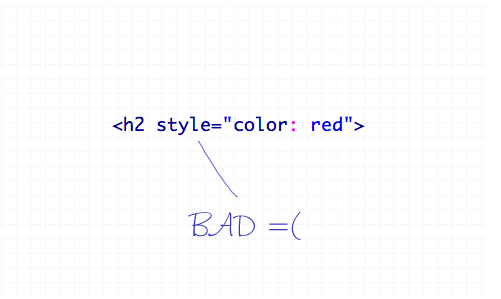
You’ve heard it a thousand times – Inline styling is bad. The whole point of semantic HTML and CSS is to separate document structure and styling, so it just doesn’t make sense to go placing styling directly in the HTML document. Remember to always keep your styles in your stylesheet where they belong.

Crime 8: Adding or Removing Borders in HTML
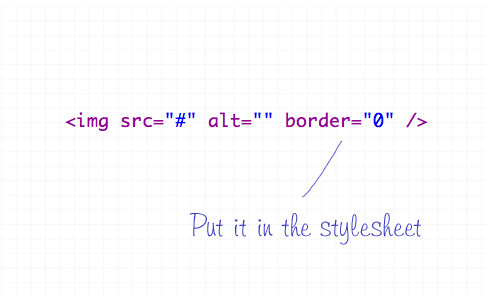
The border attribute is another presentational effect, so semantically it should be left to the CSS, even if it’s removing a default border from an element.

Crime 9: Not Using Header Tags
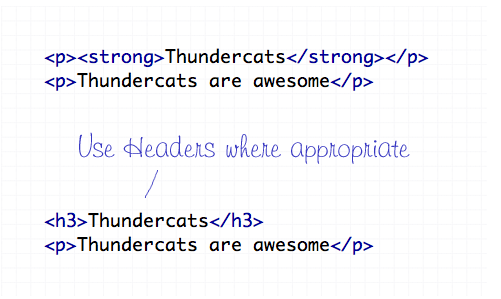
Header tags are available all the way from <h1> to <h6>, and make handy tags to separate your document into titled sections. If you have a selection of words indicating what content is due to appear next, chances are one of the header tags will fit right in. Your choice of header tag depends on the flow of your document, try to naturally insert them in order of 1-6 where appropriate.

Crime 10: The Unspeakable Use of <blink> or <marquee>
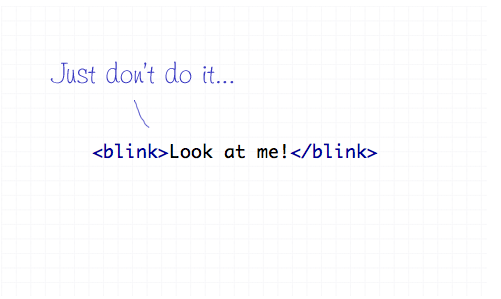
Apart from not even being part of the official collection of standard HTML endorsed by the W3 Consortium, the <blink> and <marquee> tags are just pure ugliness. If there’s something you need to draw attention to, I’m sure you can think of plenty of alternate ways to draw focus to that area of the page than to have it flash on and off or scroll across the page!

Free web shadows pack for every subscriber

Join the mailing list to have new content delivered straight to your email inbox. Every subscribers gets a free pack of realistic web shadows.

Written by Chris Spooner

Chris Spooner is a designer who loves experimenting with new web design techniques collating creative website designs. Check out Chris' design tutorials and articles at Blog.SpoonGraphics or follow his daily findings on Twitter.

248 Comments

  1. Mario says:

    me liek thunderkatz

  2. syikin says:

    great! i didn’t realise about the strikethrough new codes.

  3. Great advice. I practice some of these techniques but I need to go back and check that I am doing some of the others. Very good post.

  4. LimeOrange says:

    Good stuff, but what’s with the cartoon crap?

  5. Kim H says:

    Ahaha! What a great and memorable post!

    Definitely a great tool for the beginning designer :)

  6. arpit says:

    Great Job

  7. JeraJdai says:

    Your article needs some fact checking. The coolest Thundercat is Cheetara.

  8. I’ve written a tutorial for an art Ning site, and had to space down from a photo. I hate to say it: I used the line break umpteen times to get the photos positioned where I wanted them. I am totally unused to html – what code should I have used instead?

  9. TBS says:

    Forget the title attribute in hyperlinks is also unforgivable

  10. Gerasimos says:

    Excellent article. Shall we add to the list the naming conventions of sections like which i must admit it’s a personal thing but why not use names that make sense like ?

  11. Sharon says:

    Glad to see I’m not a super-criminal. The only one I didn’t know about was the & but I’ve never really had occasion to use them anyways.
    The only time I use inline styling if there’s just the one bit on a single page that needs to be different. Do I need a lawyer? :-)

  12. Do Jacobson says:

    Nice article!
    There is only one place where inline CSS is unavoidable, and those are HTML-newsletters. Most e-mailclients don’t support external CSS and will strip any CSS that is placed in the header or body.

  13. murrydan says:

    I find myself correcting crime #1 at times, nice to have an article that calls it a crime, makes it more urgent to change my behavior.

  14. Dan Kuck says:

    Cliff is right. The real crime is using {em} and {strong} when they aren’t appropriate.

    If we’re working toward a semantic web, we need to focus on using those tags correctly. The web is full of things like {em}The Grapes of Wrath{/em}. That can get very annoying to someone who uses a text-reader and has to hear book titles emphasized every time they are mentioned on a webpage.

    {em} and {strong} are usually lies. At least {i} and {b} give no information.

  15. disha says:

    itz good….i pleased to c ol comments and views.

  16. shadowMason says:

    nice… thank you. My students will like this. Well, maybe not… but I do.

  17. mergs says:

    awesome article

  18. Cliff definitely makes some good points. Agreed across the board. As far as using titles in {a} tags, never done it but perhaps I should start. Thanks for the roundup. I spend most of my time focusing on database programming, but it’s always refreshing to find ways to improve my markup.

  19. Mike says:

    Cliff is correct; your crime number four was badly demonstrated, as the bold text doesn’t appear to need any emphasis, and the text in STRONG tags appears to need two levels of emphasis.

    There are plenty of occasions where text, such as a book reference, need a particular format, and for those cases B and I are perfect, and perfectly acceptable.

  20. anapatrice says:

    I certainly learned a lot today…Was fond of doing all the bad things your wrote about….I need to break the habit, especially the thing. Thanks!

  21. Matt says:

    Good advice. The strikethrough code tip was new to me. I’m going to start using that right away.

  22. Kaplang says:

    some really useful info, thanks :)

  23. Azenquor says:

    Thanks a lot for the info…

  24. Lizzy says:

    Ok, good to know I’m a big criminal. :(

  25. Lisa says:

    I didn’t know about the strikethroughs — but — inline CSS – is there any other way to get gmail to recognize CSS? That’s the only time I use inline CSS.

  26. Aaron says:

    Good post but you might want to explain why a bit more for the newbies :)

  27. Aaron says:

    I wouldn’t use {del} and {ins}

  28. SunJoo says:

    Another great tips. Something I missed.

  29. yazılım says:

    Great post, did not know about strike tag

  30. Nice. I made the mistake of putting block tags into inline tags awhile back. Didn’t realize why the editor was complaining. Thanks for explaining that to me.

    Instead of using a bunch of tags, I use a div with inline styles for margin or padding. I’d have to write innumerable classes for each possible scenario.

    Thanks

  31. Michael says:

    Liked: Use of Thundercats

    Disliked: That you pretty much summed up the fact that some tags are deprecated for no reason at all, and there is 0 penalty for using them.

    Just goes to show how badly we need HTML5 to be semantically un-retarded.

  32. JETR NSEF says:

    Gud Work dude, weldone
    nice

  33. samma89 says:

    hmm……its gud to know about this.thnx dude.!

  34. Only one crime: “5 – “

  35. Hey,
    That is nice for me. I’m a software developer (hard core not gui). That is why that article helped me about css and html.Because I have been trying to design my website also I couldn’t.

    Thanks

  36. That is a nice perspective. I’m a software developer. (not gui) I have been trying to design my personal site also I could not :).

    I will check this rules on my personal site.

    Thanks.

  37. David says:

    Panthro was always my favorite.

    BTW — Nice list of crimes ;-)

  38. Ant says:

    In HTML5 it is allowed to wrap block element with «a» (at least it’s correct!).

    Also, if image is for decorative purpose, isn”t better to use css background instead?

  39. Richard says:

    re: #8, some rich text editors automatically assign border=0 to the img element – otherwise good!

  40. Michelle says:

    one of the best articles i have ever read on html, really good and very useful, thanks

  41. elena says:

    You are a total cutie.

    I guess the article was ok too. ;)

  42. No one knows everything says:

    I disagree with rule #10, and I’m not the only one. I’m not saying you should use the ‘marquee’ and ‘blink’ tags, but the effect, at least for ‘marquee’, could be useful for a short headline. So it really isn’t ugly, if done right. In fact the effect is to be added in to CSS3, so someone finds it useful, other than me.

  43. jase says:

    Instead of reading this post, you could just validate your site at w3c. It’ll tell you what you’re doing wrong

  44. syahzul says:

    great article. thank u very much.

  45. supercomputerfreakyzebra says:

    this, is just, wow, omggd, wow, my zebras all happy(: thannnkkkyouu, your bad sselff(:

  46. Milo says:

    I’m in favor of the semantic-only approach, in theory, but it’s clear that most people don’t understand that just because something is visual doesn’t make it non-semantic.

    The term “strong” is especially funny I think. Whoever had referred to strong text or described bold-set words as “strong” before the invention of this misguided element? There is no such thing as “strong” text. As for emphasis, well, should we have a sarcasm tag too, depending on the particular (semantic) meaning of the italics?

    If this is the point — to break down semantic typographic attributes into abstract meanings (perhaps in the name of accessibility), why don’t we have a span around each and every word with a “dictionaryid” attribute indicating its specific meaning (assuming the meaning has been registered by some bureau of language standards — otherwise, should you really be using a non-standard word? It might not validate).

    Do whatever works unless there’s actually a reason not to. Consecutive line-breaks? There may be a more efficient way to do that (unless you only need the gap once), but it’s not like there’s any browser that won’t understand the br tag… I don’t like this dogmatic approach at all.

  47. Hasan says:

    Inline styling (Crime 7) is not a crim!! Many famous giants like google, yahoo, w3.org use it & recommends them.
    They come in handy when you do not wanna load a new stylesheet file for just few new lines of styling, Instead you can use inline style tag to achieve performance.

  48. Tom says:

    I take most of these for granted but the online styling doesn’t sit very well with me. Obviously it’s best to put everything into CSS but sometimes it’s actually more convenient to add a width to an id/class-less div than to give that div an arbitrary id or class that will be hard to track down later – should I need to ammend it. What I am considering is a more modularised approach entirely:

    name and define classes iny CSS for widths and heights so I can add them into te HTML freely (
    .x100 { width: 100px; }
    .y100 { height: 100px; }
    ).

    This would negate the entire problem: I’d say heights and widths are the most frequent examples where the above usage could come in handy. I already use classes like the above to float or align elements and chain them on to the HTML.

Comments are now closed