Line25

10 HTML Tag Crimes You Really Shouldn’t Commit

Read the full post

You better watch out, because the HTML police are about. They scour your code and pick out the most unspeakable crimes against HTML markup. This handy list of ten HTML tag crimes sheds some light on some of the most common coding mistakes and helps provide an alternate solution. Tips include writing valid markup, making semantic choices, avoiding deprecated tags and more!

Crime 1: Placing Block Elements Inside Inline Elements
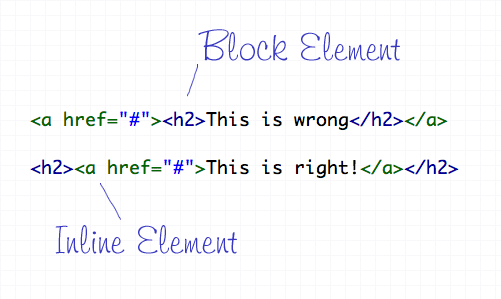
HTML elements can either be displayed in two ways, Block or Inline. Each tag by default is naturally either a block or inline element. Block elements include divs and paragraphs, that make up the structure of the document. Inline elements on the other hand should sit inside block elements and go with the flow of the document, examples include anchors and span tags. With this in mind, inline elements should always go inside block elements, and never the other way around.

Crime 2: Not Including an ALT Attribute on Images
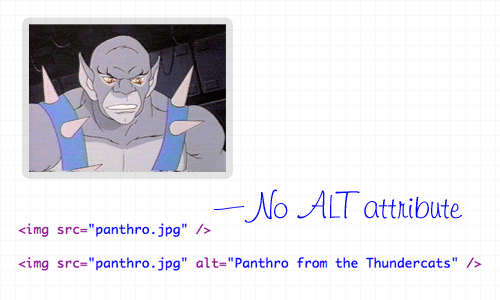
The ALT attribute is a required element on all images displayed on a web page. It helps users determine what the image is, should they be browsing on a screen reader, or simply on a slow connection. The ALT attribute should describe the image being shown, so an alt=”image” is bad practice. If the image is purely for decorative purposes, simply add an empty alt attribute, such as alt=”".

Crime 3: Not Using Lists When Necessary
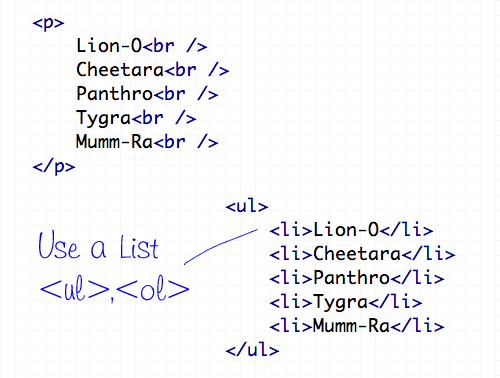
The handy UL (and OL) tags have a bunch of uses and are extremely versatile for the display of all kinds of page items. Unsurprisingly the Unordered List tag does a great job of displaying a list of information, so don’t even think about using a bunch of line breaks ever again!

Crime 4: Using <b> and <i> for Bolding and Italicizing
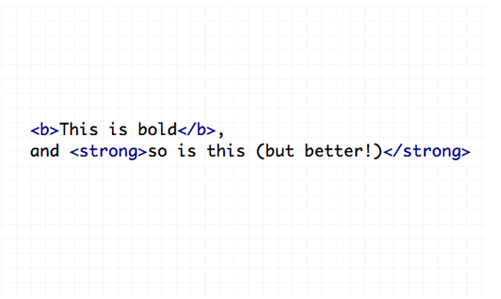
The <b> and <i> tags make the text appear bold and italic respectively, but semantically they are classed as presentational tags, therefore the effect would be best replicated with the CSS styles of font-weight and font-style. If the passage of text suggests areas of importance, they should be highlighted with the <strong> or <em> tags, which basically do the same job as <b> and <i>, but also make the world a nicer place.

Crime 5: Using Too Many Line Breaks
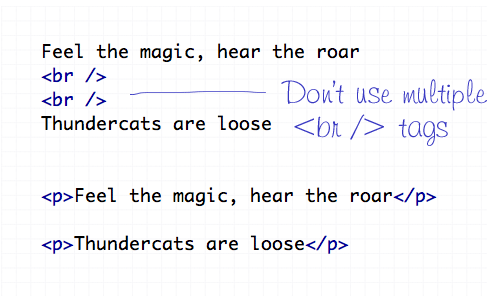
The line break tag of <br /> should only be used to insert is single line breaks in the flow of paragraph text to knock a particularly word down onto a new line. It shouldn’t be used to make gaps between elements, instead, split the text into separate paragraphs, or adjust the margin styled by CSS.

Crime 6: Using The Wrong Strikethrough Tags
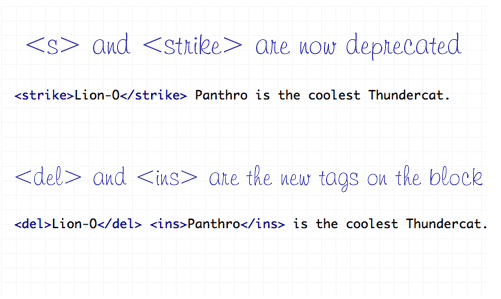
In the olden days, <s> and <strike> were around to allow edits and amends to web text. However they are now classed as deprecated tags, which means they still work fine (in Transitional), but there’s a set of new tags on the block – <del> and <ins>. These new tags are used together to show deleted, and the subsequently inserted text in a document.

Crime 7: Using Inline Styling
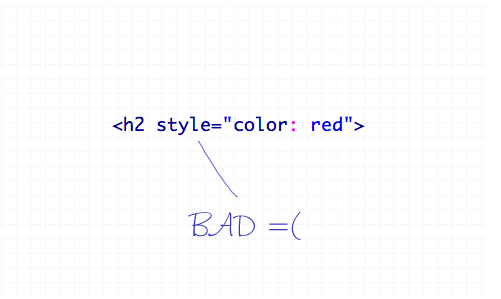
You’ve heard it a thousand times – Inline styling is bad. The whole point of semantic HTML and CSS is to separate document structure and styling, so it just doesn’t make sense to go placing styling directly in the HTML document. Remember to always keep your styles in your stylesheet where they belong.

Crime 8: Adding or Removing Borders in HTML
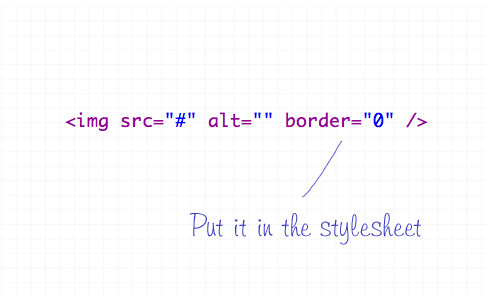
The border attribute is another presentational effect, so semantically it should be left to the CSS, even if it’s removing a default border from an element.

Crime 9: Not Using Header Tags
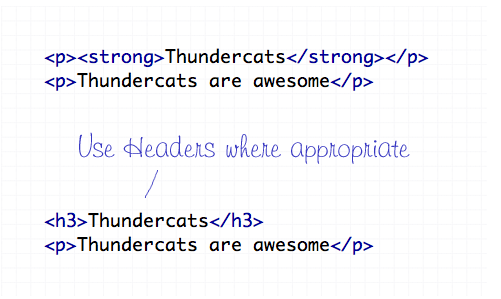
Header tags are available all the way from <h1> to <h6>, and make handy tags to separate your document into titled sections. If you have a selection of words indicating what content is due to appear next, chances are one of the header tags will fit right in. Your choice of header tag depends on the flow of your document, try to naturally insert them in order of 1-6 where appropriate.

Crime 10: The Unspeakable Use of <blink> or <marquee>
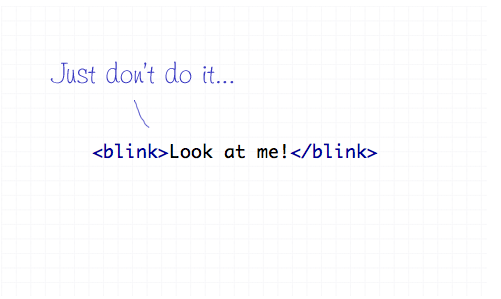
Apart from not even being part of the official collection of standard HTML endorsed by the W3 Consortium, the <blink> and <marquee> tags are just pure ugliness. If there’s something you need to draw attention to, I’m sure you can think of plenty of alternate ways to draw focus to that area of the page than to have it flash on and off or scroll across the page!

Subscribe by Email

Don't miss an update! Have new content delivered straight to your inbox.

Written by Chris Spooner

Chris Spooner is a designer who loves experimenting with new web design techniques collating creative website designs. Check out Chris' design tutorials and articles at Blog.SpoonGraphics or follow his daily findings on Twitter.

248 Comments

  1. Iva says:

    WHO on Earth even remembers the blink tag? That IS traumatising.

    I never used ins tag before, so I did learn something new here.

  2. Jeremy says:

    This is great, thank you.

  3. George says:

    It would be good if you gave some specific reasons for not doing these things beyond simply saying “don’t do that, do this instead”.
    How would you handle a situation where you want to make an entire block of information clickable with a link to a detail page? For example, if you have a list of people with some basic information displaying for each, and you want to be able to click anywhere on that person’s “Block” to be directed to their entire bio.

  4. AndrewGene says:

    What would you do in order to simulate the tag? I have only used it once but it did the job nicely. Anything I can do instead without resorting to javascript?

    • AndrewGene says:

      that’s supposed to be “marquee” tag…the commenting system took out the “”

  5. Fred Alger says:

    It’s almost embarrassing to admit that I won an award for a site made with blink and marquee tags. In my defense, it was the first site I ever built, and was pretty hot stuff for 1995.

    I wonder about using align=”" on an img tag. It seems like it’d be better to put that in the stylesheet as a float, right?

  6. Matt says:

    I am loving this list, I am sure almost every one who has worked with HTML has made at least one of these mistakes at one point in their career.

    Excellent list!

  7. Dori says:

    I think it’s important to note for beginners that there are times when it’s OK to break the “no inline styles” rule. There IS a time and place for them.

    For instance, let’s say I want my H2 tag to be a different color on each of the 20 pages of my website. Is it better to use an inline style for each one, or add 20 more lines to my stylesheet that have to be loaded for every page hit on my site? Sure, twenty lines isn’t bad but when you have a complicated website that’s NOT based on a cookie cutter template, that number can grow fast! There’s no good reason to bloat your external CSS with numerous styles that are only used once, other than trying to be technically correct.

    Other than that, I must say your article is very nicely written. Thanks.

    • Dana says:

      At that point, I believe you would use styles in the head with the appropriate classes/ids or just targeting the standard tags. I’m hard pressed to think of a reason inline styles would have to be used when I’m not just feeling lazy and don’t want to do it right. :P I’ve done it before.

    • Brandon says:

      I have to agree with Dana, the only time I’ve used inline styles is when I’m feeling lazy. Sometimes, yes, you may want to target classes/id’s specifically on that page, but it would be better to make a specific stylesheet for this, or as Dana mentioned, add it to the head of the document, and not within each particular element. I think most people have done it before, myself included, but it makes for messy code.

      • Dana says:

        Most secondary pages get the styles in the head. The index page almost always needs it’s own stylesheet. Multiple stylesheets helps clean things up, for sure!

    • JR says:

      I agree with Dana also, but there is one specific instance where inline styles are appropriate: dynamically generated divs that are being affected by jquery’s (for example) animation functions. Sometimes a div needs display: none to begin with, and doing that with a class doesn’t always work.

      • Dana says:

        And, further down, the comments, someone mentioned CMS issues. That’s also true. So, we have specific JavaScript declarations and CMS workarounds. :)

        • I love breaking the rules. Oh, I’m so cool. I smoke too.

          Really, though.. I’m kind of tired of seeing how Semantics can create cults in coding. So, this is how religions get perversed and forget their purpose. I’m glad to bear witness.

  8. Tom says:

    Didn’t know about the strike one, the rest seam simple enough to follow.

  9. Ozh says:

    Yeah, never commit these crimes, because they are deprecated manners and they, errr, like, humm, render totally OK in all browsers.

  10. Thierry says:

    I find inline styles to be a necessary evil when dealing with CMS-generated elements (such as adding a CMS image as an element’s background.)

  11. designiac says:

    straight to the point!

    I’d like to add:

    Don’t use -tags
    Use instead ,

  12. designiac says:

    oh, my html-tags disappear in my last post!

    Don’t use center-tags
    I recommend to use align=center in p-tags, div-tags…

  13. Will says:

    Thanks for the info. I probably have some mistakes in my site that need to be taken care of. Good advice!

  14. Thanks for sharing this list, Chris – and particularly for writing it in such a way as to give me a good chuckle at the end of the day. :)

  15. Brad says:

    SNARF SNARF

  16. Placehold says:

    Well written Chris, Very nice,

    Also most of this (If you are a good programmer/designer/developer) would come naturally however laziness plays a huge factor in it.

    Thanks for making me smile today lol :)

    Regards

    Craig
    Thanks for the

  17. sergi says:

    i’ve been developing for years, but still learned a couple things from this list, in particular about “no multiple ‘s” and the use of and .

    thanks for the article, dude.

  18. John Cartago says:

    I sometimes do the inline styling when I get lazy haha :)

  19. Em says:

    I often find that people use just to style text with a strikethough rather than using {text-decoration: line-through;}.

  20. Em says:

    Let’s try that again. Ahem.

    I often find that people use the del tag just to style text with a strikethough rather than using {text-decoration: line-through;}.

    • Stuart W says:

      As they should in most cases

      • Nox says:

        No, they shouldn’t. The del tag has a specific semantic meaning, separate from how it looks. If people are using del just to give their text a decorative line-though, they are DOIN’ IT WRONG, as the kids say.

  21. Josh says:

    Crime 11: Not making abundantly clear what happens to HTML markup that users enter in a comment form.

    • Ahruman says:

      So very, very true. What use is semantically pure piece of HTML that renders as a site with poor usability?

  22. Rafael says:

    Well I don’t kow some things out there just make sense but also means a hell of extra work in the end.

    I mean, if a simple “i” will do the italic job, why should I type lots of extra characters and extra files (the css sheet)?

    Well, except when talking about deprecated tags, many of this “rules” just seem pointless and dictatorial to me. I mean, who said I can’t use five BR tags if I want to jump five lines? won’t it work fine in any browser? yes it will. isn’t the BR tag out there to be used? yes it is. So… I really don’t get the atual point of some of this rules some people put as “crimes”. BR are crimes now heh? Oh c’mon!

    I go for the easiest, specially if it means the same result at all.

    And what about the first tip: what if I want the whole block element to work as a hyperlink, and not just the text inside it? in this case I have to place the “a” tag outside the “div”, cause I want all the div to be a link (without java’s onclicks either).

    • Jason says:

      I’m going to make the assumption based on your post that you also use tables for layout. Web standards are like a toolbox full of tools. Your approach is essentially choosing to use the hammer to make a hole. Will it work? Sure. However, any professional will tell you that a drill is the right tool for that job.

      If you think using a style sheet is extra work and the “i” tag isn’t deprecated then I am curious where you have been for the last, I don’t know, 10 years or so?

      • Stuart W says:

        The “i” tag isn’t deprecated

        • kevinMario says:

          I’ve to agree with Rafael with his BR and block A tag – although the later is really rarely used since you will end up with a clickable white space if you don’t set it up properly.

          But yeah, the BR point is silly.

  23. Jason says:

    I agree and most of those would be easily caught if you take the time to validate your code.

    I would also like to add a couple pet peeves like:

    Don’t use a bunch non-breaking spaces, apply some padding with CSS instead.

    Use a definition list instead of an unordered list if one is called for.

    And for God’s sake, use comments – that’s what they’re there for. A simple comment to say what div you’re closing can save you a ton of time and headache.

  24. Whazor says:

    Maybe if you use some CSS for the blink tags, it would be useful for highlighting things.

  25. Leo says:

    Very nice breakdown of common errors I usually see.
    Learned the DEL and INS tags myself.

    thanks!

  26. Jack Frost says:

    If it shows up correctly on the 2-3 major browsers, who cares? Customers aren’t looking through my code saying, “Gee, I really wanted to buy a scooter from this site, but… they’ve got a {B} tag in the code. I’ll just buy from someplace else!”

    lmao.

  27. kL says:

    But {B} and {I} elements *are* the most semantic elements for bolding and italicizing!

    Maybe you’ve meant emphasis and strong emphasis? But these are not synonymous with bold and italic. Speaking of them as bold/italic is like “use h1 for big text!”.

    • I completely agree.

      If you want a piece of text to be bold or italic, use the B or I tags. If you want to (strongly) emphasise a piece of text, use EM or STRONG. Don’t use EM to make your text italic or STRONG to make text bold.

  28. Dave says:

    @kL bold and italic are only semantic for visual presentation – they hold no meaning for a screen-reader. How do you interpret “bold” if you are reading it allowed to some one else for example?

    Remember the whole point for the revised markup was to make the documents structure independent of presentation and B/I tags do not allow that as they inherently refer to presentation and not to the meaning of the document.

    • Graham says:

      Meah. I used to preach this stuff back a few years ago, but find myself caring less and less these days. Please don’t tell me that a screen reader really sees more value in ‘strong’ than ‘b’ tags. And if so, its the GD fault of the screen reader.

      And in-line styles are kind of necessary when you enter JavaScript development. Plus, if you truly need the style only once, then it seems easier to me to maintain if it’s right there in the markup. This coming from a guy who used to quote the whole “separation of markup and presentation” thing all the time.

      Which, btw, I have yet to see ANY real benefit from. Honestly, if you use a stylesheet for every single style rule on your page, it will become a bloated mess over time, with 1000 entries.

  29. erne says:

    i strongly recommend using
    text-decoration: blink;
    instead of

    ;)

  30. amrelgarhy says:

    Nice article, nice explanation, nice examples and nice blog :).

  31. Great list. I can’t imagine anyone still using blink. That has to be the worst crime of them all.

  32. honour chick says:

    great advice w/ emphasis on “blink”. very useless declaration. ;)

  33. Jeremy says:

    I’m ashamed to admit I’ve done all of this at one time or another. I also admit I love using blink to annoy my co-workers!

  34. Dennis says:

    These items are very basic, but unfortunately, very necessary! Great article.

  35. jerry black says:

    … gonna start using the blink tag now!

  36. devolved says:

    I am innocence2 ;)

  37. Sherry says:

    1) Thanks! Great things to remember… tho, thankfully, I’ve only been guilty of 2 on this list… will work to avoid those. :)

    2) Thanks for referencing Thundercats. That totally rocks my day. :D

  38. BD says:

    While I would advocate doing it with CSS, there are certain very limited areas where blinking text is not only useful, but also can prevent end lusers from getting themselves into hot water.

    Don’t get me wrong, I’ve used blink exactly twice in my life, but for all things there is a time.

    Better rule would be “Don’t use blink just to use it. If the world would keep on spinning without the extra extreme emphasis that it imparts, you probably don’t need it.”

  39. Norman says:

    I probably made all the mistakes on the list (except blink of course) at least once during my rather short web career.
    But as I got more experienced with web standards by now, I totally agree with every point on the list. Its not like we have to code that way but “code is poetry” and I’d rather like to code nice stuff. Not to please others or customers but to please my conscience ;)

    good list!

  40. Tom Duong says:

    Thanks for this informative post. I think it’s about time to clean up some of my HTML tags.

  41. Tomas says:

    I disagree with people that want to split up everything endless much. You can’t found things at one place, you need to go to a chain of references/functions/whatever to get the big picture. Why not making something global when it need to be shared and not everytime? Use the tags that suit your needs, you are not going to be punished, but its good to think one step ahead and being aware of the risks. Read, test, expriment and make your own opinions, its not written in stone.

  42. Some good tips, not sure about the multi one

  43. I didn’t realise the first one until I validated my code using the strict Doctype. Yay for validation! If you get the web developers toolbar and validate your XHTML, CSS and accessibility there’s less chance you’ll be committing those HTML tag crimes!

  44. Luis says:

    Thanks for the tips, bookmarked. I’ll quote you in a future post of mine.

  45. aharen says:

    Great Article, some of these mistakes i have made myself, but its never too late to start correcting your mistakes right! :)

    cheers

  46. Awesome article, Thanks Chris. Im definitly showing this to my Web Design students!

  47. engin says:

    Blink is cool!

  48. Marcel says:

    I think you could have done better.
    I would say that this is a beginner’s article. No one does mistakes like does after a couple of years of experience.

    Thanks,
    Marcel

  49. Andris says:

    These are the basics! Thanx for the summary. But shouldn’t it say “Headings” instead of “Headers” in no. 9?

  50. How do you handle inline images in a way that a feedreader will properly display the image? Using classes and CSS with float:left/right will make the result look quite ugly in a feedreader, inline styles work better in that case. Any suggestions?

    • Hi Jörn says:

      Don’t use float if it will render ugly, instead use classes with rules defining positioning, padding, and margins for a left justified or right justified image.

Comments are now closed