Line25

10 HTML Tag Crimes You Really Shouldn’t Commit

Read the full post

You better watch out, because the HTML police are about. They scour your code and pick out the most unspeakable crimes against HTML markup. This handy list of ten HTML tag crimes sheds some light on some of the most common coding mistakes and helps provide an alternate solution. Tips include writing valid markup, making semantic choices, avoiding deprecated tags and more!

Crime 1: Placing Block Elements Inside Inline Elements
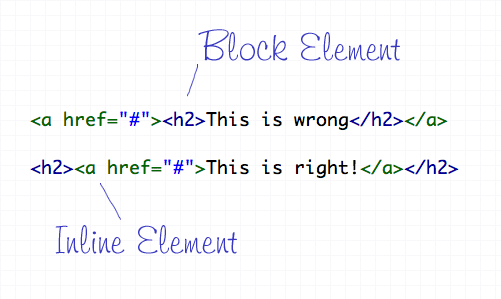
HTML elements can either be displayed in two ways, Block or Inline. Each tag by default is naturally either a block or inline element. Block elements include divs and paragraphs, that make up the structure of the document. Inline elements on the other hand should sit inside block elements and go with the flow of the document, examples include anchors and span tags. With this in mind, inline elements should always go inside block elements, and never the other way around.

Crime 2: Not Including an ALT Attribute on Images
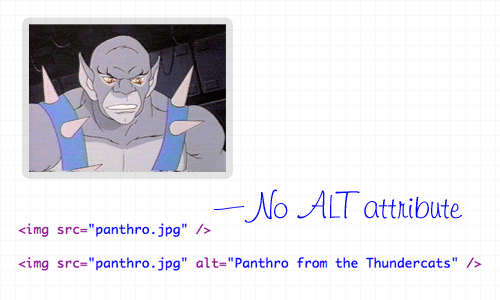
The ALT attribute is a required element on all images displayed on a web page. It helps users determine what the image is, should they be browsing on a screen reader, or simply on a slow connection. The ALT attribute should describe the image being shown, so an alt=”image” is bad practice. If the image is purely for decorative purposes, simply add an empty alt attribute, such as alt=”".

Crime 3: Not Using Lists When Necessary
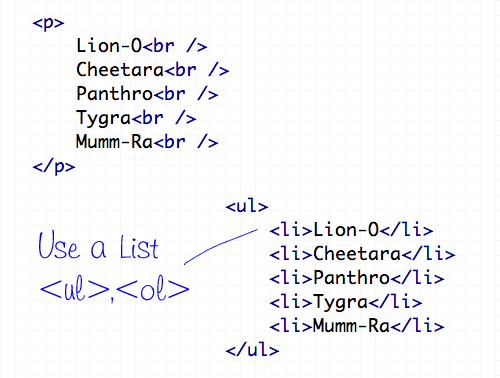
The handy UL (and OL) tags have a bunch of uses and are extremely versatile for the display of all kinds of page items. Unsurprisingly the Unordered List tag does a great job of displaying a list of information, so don’t even think about using a bunch of line breaks ever again!

Crime 4: Using <b> and <i> for Bolding and Italicizing
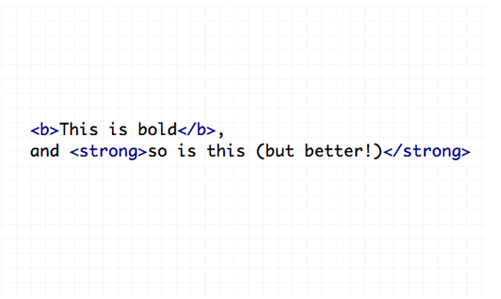
The <b> and <i> tags make the text appear bold and italic respectively, but semantically they are classed as presentational tags, therefore the effect would be best replicated with the CSS styles of font-weight and font-style. If the passage of text suggests areas of importance, they should be highlighted with the <strong> or <em> tags, which basically do the same job as <b> and <i>, but also make the world a nicer place.

Crime 5: Using Too Many Line Breaks
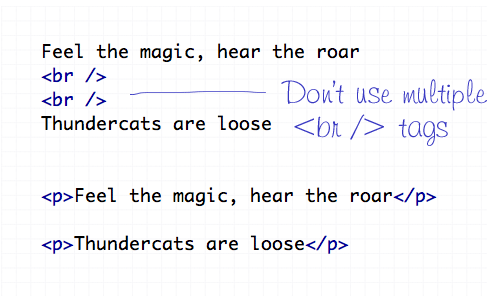
The line break tag of <br /> should only be used to insert is single line breaks in the flow of paragraph text to knock a particularly word down onto a new line. It shouldn’t be used to make gaps between elements, instead, split the text into separate paragraphs, or adjust the margin styled by CSS.

Crime 6: Using The Wrong Strikethrough Tags
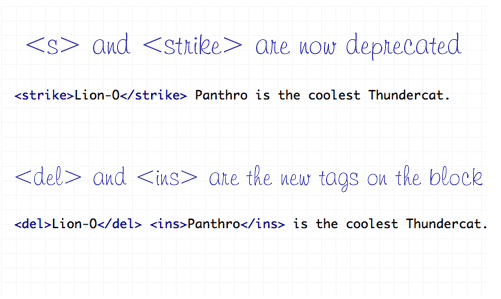
In the olden days, <s> and <strike> were around to allow edits and amends to web text. However they are now classed as deprecated tags, which means they still work fine (in Transitional), but there’s a set of new tags on the block – <del> and <ins>. These new tags are used together to show deleted, and the subsequently inserted text in a document.

Crime 7: Using Inline Styling
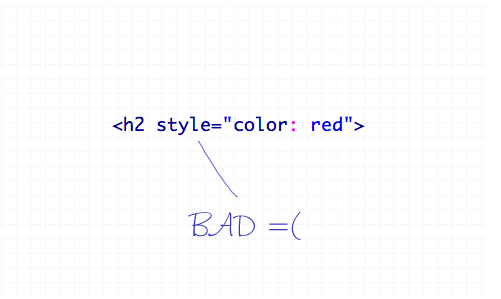
You’ve heard it a thousand times – Inline styling is bad. The whole point of semantic HTML and CSS is to separate document structure and styling, so it just doesn’t make sense to go placing styling directly in the HTML document. Remember to always keep your styles in your stylesheet where they belong.

Crime 8: Adding or Removing Borders in HTML
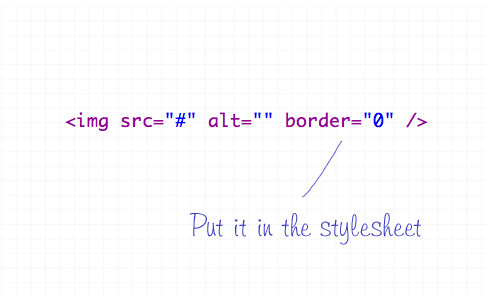
The border attribute is another presentational effect, so semantically it should be left to the CSS, even if it’s removing a default border from an element.

Crime 9: Not Using Header Tags
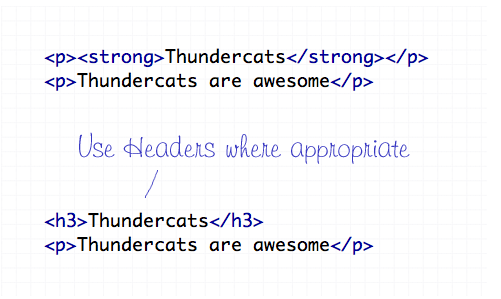
Header tags are available all the way from <h1> to <h6>, and make handy tags to separate your document into titled sections. If you have a selection of words indicating what content is due to appear next, chances are one of the header tags will fit right in. Your choice of header tag depends on the flow of your document, try to naturally insert them in order of 1-6 where appropriate.

Crime 10: The Unspeakable Use of <blink> or <marquee>
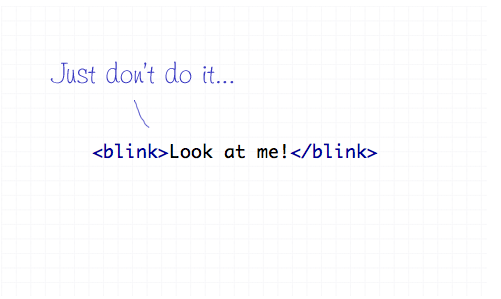
Apart from not even being part of the official collection of standard HTML endorsed by the W3 Consortium, the <blink> and <marquee> tags are just pure ugliness. If there’s something you need to draw attention to, I’m sure you can think of plenty of alternate ways to draw focus to that area of the page than to have it flash on and off or scroll across the page!

Subscribe by Email

Don't miss an update! Have new content delivered straight to your inbox.

Written by Chris Spooner

Chris Spooner is a designer who has a love for creativity and enjoys experimenting with various techniques in both print and web. Check out Chris' design tutorials and articles at Blog.SpoonGraphics or follow his daily findings on Twitter.

248 Comments

  1. Great article, I completely agree with everything you just said, I just need to learn to put it into practise myself!

    • Juanita says:

      Yes. I would need to have a personal assistant to do everything else in my life that I would no longer be able to do because I have to update all my code. I agree these are best practices but they are hard to implement retroactive on an established blog. I am slowly chugging along making these changes.

    • 9swords says:

      Echo that, consider me a repeat offender :)
      I commit some of these coding crimes as i design pages then i go over the code afterward to remove them.

  2. P.S. Keep writing articles like this, they’re really helpful!

  3. Marco says:

    Damn you Chris – I was written an article pretty similar to this one ;) . Will have to trash it now, otherwise you’ll sue me as a copycat.

    Still, very much enjoyed reading this article! Great/cute code examples.

    Also, don’t forget this crime:

    I want to have some space between some sentences       So I’ll do this!

  4. Great Blog, I put all this into practice myself anyway. I was not aware of the strikethrough tags so thanks for that!

  5. Alin Ivana says:

    Keep it up you guys, your posts rock! digging and retweeting is fun :D

  6. Glyn Jackson says:

    I think your bang on with everything other than the ‘b’ tag . The ‘strong’ tag is used when you want to add emphasis to particular words or phrase, but some screen readers may use a different inflection when they come across these tags to communicate the emphasis. if your aim is to make a work bold always use ‘b’ tag never ‘strong’ b’ tag works in almost very browser known!

    what to read more on this: http://www.think-ink.net/html/bold.htm

    • On the other hand the ‘b’ tag is presentational, therefore semantically, should be left to the CSS.

      Plus, if something on the page that is being made bold, it would suggest that it’s an element that need emphasis – so here’s when the strong tag comes into play. If not, then chances are a simple span would fit better.

      I get your point though, during my research I read about screenreaders interpreting ‘b’ and ‘strong’ differently. But overall, if the BBC don’t use ‘b’, that’s good enough for me :-)

    • ‘b’ means ‘bold’. ‘em’ means ‘emphasis’. ‘strong’ means even more emphasis. ‘b’ is presentational, ‘em’ & ‘strong’ are semantic. Period.

    • Dylan Parry says:

      I’d have to agree, in some way, with this. If you sole intention is to create bold text, without any other real meaning, then the “b” element might be the way to go—though a “span” with a class might be another solution.

      There are cases where you might want to use the “i” element too. For example, in Latin names of animals/plants you should italicise part of the name (the species bit) and to use the “em” element would be semantically incorrect. You could use an “i” element with a class of “species” for example, which would give semantic meaning to the element.

      All that said, cases where those two elements can correctly be used are few and far between, so it’s unlikely that you’ll ever need to use them.

      • Foamcow says:

        On the other hand, if your sole intention is to make some text heavier without adding emphasis then the “correct” tag would be a .

        You would then apply a visual style via CSS to that span (via a class or hierarchy).

  7. Sankar says:

    Hey Chris,

    These are the simple and common mistakes that everyone done in html. Nice article, information organized well.

    Thanks
    Sankar

  8. Adam says:

    I take it your abit of a thundercats fan? :) It’s like a LSD trip :D

    Cannot belive anyone would use blink anymore haha.

  9. Farooq says:

    really nice and important crime report for HTML tags, but people are use to commit these crimes in there projects.

  10. Swerve says:

    Good post. We should should start a ‘Cruelty against HTML elements’ foundation? They can monitor, and punish offenders :-)

  11. theodin says:

    wicked article, I didn’t even realize about the deprecated tags, thanks!

  12. Toby says:

    Lolled at Crime 10

  13. saurabh shah says:

    nice post chris … …

  14. Elliot says:

    don’t ever, ever, ever look at the code for html email..

  15. Meera Tank says:

    Great article, very simple tips there, yet so many people trip over on these.

  16. Marc Ashwell says:

    the funny thing is that the font attribute is so old, it doesnt feature. you could get your hand copped off now for using it.

  17. Great article. I usually stay away from these 10 crimes. I do find myself forgetting the alt tag sometimes though.

  18. For few outdated browsers, you still have to put border=”0″ on images, because border:0px; doesn’t quite do the trick.

    • Brandon Florkey says:

      What outdated browsers are you referring to? We design for IE6 at my work, unfortunately. I use border:none; in the css and it takes off border’s on linked images just fine.

  19. grazz says:

    I would also call non indenting HTML code a crime. Not a major one, but still…

  20. Matt Ward says:

    Great post! Especially love the hate toward the marquee tag. I actually have a new client that just came to me, and his website currently uses it. Worst part is he thought it looked cool. At least he avoided the blink tag.

  21. Sid says:

    Panthro is blatantly the best Thundercat! Oh, great post too!!!

  22. Adam says:

    It’s a shame that some large email clients (inc Outlook, Gmail) don’t agree with Crime 7.
    They seem to ignore most HEAD content, inline styles seems the only compromise.
    Thunder… Thunder…. aaaaaarrgh!!

    • Foamcow says:

      I kind of agree, but they are “email clients” and not “web browsers”.

      An email client’s rendering of HTML is an added extra rather than its main purpose.

  23. normalfx says:

    Thanks Chris. I’ll always keep it in my mind.

  24. Dan Wellman says:

    Number 11. using inline event handlers ;)

    onclick=”killmenow()”

    urgh!

    great article

  25. Patrik says:

    Well, you say that you should use alt on images, but you don’t :)

  26. Alex says:

    Thanks for this post! :-) I make one of those mistakes but I’ll never do it again after I’ve read it here. :-) Your post is a great reminder!

    Keep it up!

  27. Teddy says:

    I guess one of the most prominent problems is designers and coders alike unintentionally wrapping a block element in an inline element – and the most prevalent examples are wrapping a block element with <a> … </a> tags. Although the codes are still rendered properly in most browsers, further perpetuating the wrong information that it’s okay to do so (eg – making whole link blocks clickable by wrapping them in <a> … </a>), there are valid ways to go about doing so.

    I second the very last crime – I’ve seen just too much of it. They make me all woozy, especially blink.

  28. Looks like the HTML Police won’t be after me then?

    :)

  29. Chris Kemp says:

    You’re right, of course. But of all of them, I’ll cop to using when I’m in a hurry. We can’t all be perfect all the time.

  30. Ash says:

    I struggle with the in-line styles. I’m concious of having large stylesheets shared across all pages, and just a little bit too dis-organised to split them in multiple files.

    One-off styles often end up in-line. But you’re right, that should stop…..

  31. Moschos says:

    Excellent!! Keep informing us :)

  32. PufferMedia says:

    This is a great list, and I certainly wouldn’t argue any of these points. It’s great to be reminded of them.

    But, yeah, let’s be honest, when dealing with large CMS sites with frequently updated content, inline styles/css can be a useful tool/cheat. I’m not talking about your average wordpress blog, but multi-tiered sites with complex css structures controlling various elements. Not all of us have the support staff to have someone comb submitted content to make sure it is semantically pure.

    I think the most realistic thing we can do as developers/designers is build a semantically sound foundation that is able to support a certain degree of html slop from authors. And sometimes, indeed, you just need to style something quick.

    Now I’m off to look at cleaning up a few sites. ;-)

  33. Siimples e direto!

  34. I would’ve thought most of these would be common sense. Crime 5 needs an explanation, whats wrong with extra tags? Well it’s like faking a new paragraph. Looks fine and causes no problems for sighted users but for screen reader users their software doesn’t know to “draw breath”.

  35. Rick says:

    That’s true, but have more crimes in the htmls tags in a webpage. Good article.

  36. My knowledge of CSS is not brilliant, subsequently, things like doing borders in the style sheet generally leads to utter disaster and so I revert back to html to get the job done and move on (as well as saving my sanity)

    Thanks for the reminder

  37. Dudikof says:

    #4 is bullshit, the rest is good.

    • Stuart W says:

      Yes, the crime is using strong and em for all bold and italicized text, whether emphasized or not

  38. HTMLsince1994 says:

    1. Who gives a fuck about strong versus b. What the hell is the different? Use styles in the css if anything. If you’re going to use tags in the html…who fucking cares which?

    2. Who cares which strike through tag you use! You apparently are one of these blokes that insists on always using the latest and newest shit. I’d say older stuff is better if, like with all these tags, they all do the same fucking thing. The older ones are more likely to work because who doesn’t know of them? The newer ones have a higher chance of not working since some people may not have bought into them yet.

    3. Sometimes using a styleinside a tag is necessary to take maximum precedence. It’s rare – but it’s made possible for a reason.

    4. All these 10 “rules” are just opinions for people who buy into the strict methods and who think their farts don’t stick. Most of them actually don’t make a difference. The day they throw syntax errors is the day I’ll fully abide by them. Until then, I’ll take strict rules with C++ and Perl, but not HTML. This is all just OPINION.

    • Teddy says:

      Before you want to get heard, learn how to respect differences.

      It’s okay that you live in the old era of Internet coding, but don’t stop others from moving on.

  39. Eric Eggert says:

    Learn the difference between tags and elements.

    • SomeOldDude says:

      STFU, Eric. Some people call all html tags tags, even when they’re elements or when they’re just things that manipulate elements. If they’re inside so a lot of people they’re tags. Whoopie fucking doo.

  40. Ege says:

    Leave “blink” alone! =p

    good list, btw

  41. PAULE says:

    You´re right Dudikof.
    They have complete different meanings.

  42. Jarod says:

    haha love the the Thundercats usage

  43. The list of tag crimes is very apt and many people including myself fall into it. The next time when dealing with html I’ll be mindful of the 10 tag crimes.

  44. Stephane says:

    From what I understand, crime 1 and 4 are allowed in HTML 5, and are there to mark stuff like company name that are not more meaningfull so they don’t require a of .

    Yes I know, another set of new rules again.

  45. Stephane says:

    Oups,

    From what I understand, crime 1 and 4 are allowed in HTML 5,«b» and «i» are there to mark stuff like company name that are not more meaningfull so they don’t require a «strong» of «em».
    Yes I know, another set of new rules again.

  46. A very interesting post… do keep them coming…

  47. macoteca says:

    Great post. The inline Vs Block elements is one of the most commond mistakes I see and the explanation was great.

  48. Alex says:

    Great article. Bonus points for having nearly all the examples use Thundercats.

    HOOOOOOOOOOOOO!

  49. Learned about strikethrough tag. Great post!

  50. Jonas says:

    Very good, thank’s :P

Comments are now closed