Line25 is reader supported. At no cost to you a commission from sponsors may be earned when a purchase is made via links on the site. Learn more
Disclosure: This post contains affiliate links. If you click through and make a purchase, we may earn a small commission at no extra cost to you. We only recommend tools we genuinely believe in.
Web design trends don’t emerge in a vacuum. They’re shaped by the tools we use, the devices people browse on, the cultural moments we’re living through, and the evolving expectations of what a “good” website looks like. In 2026, the clearest signal is this: design has become more intentional, more personal, and more immersive than ever before.
This guide covers the 14 most impactful web design trends you’ll see defining the best work in 2026 — from the micro-level (typography choices, color palettes) to the macro-level (architecture shifts, motion philosophy). Whether you’re refreshing an existing brand or starting a greenfield project, these are the trends that will shape what feels current.
1. Bento Grid Layouts
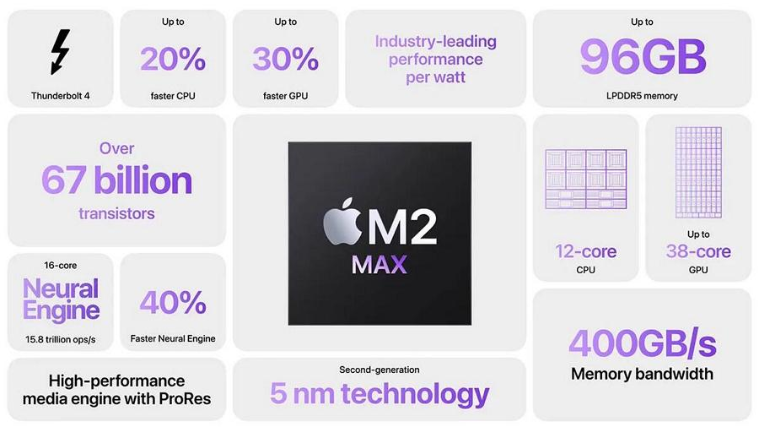
The bento grid — a modular layout borrowed from the Japanese lunchbox aesthetic — has become one of the most recognizable design patterns of the mid-2020s. Apple popularized it at their product events; now it’s everywhere from SaaS landing pages to editorial sites.
Bento grids work because they break the monotony of linear scrolling. Each module is a self-contained story: a stat, a feature, a quote. The layout creates a kind of visual rhythm that’s easy to scan but rewarding to explore.
Why it works in 2026: As CSS Grid and CSS Subgrid reach full browser support, building these layouts has become dramatically easier. No more float hacks or Bootstrap overrides — the platform supports the pattern natively.
Best for: Product launches, feature pages, portfolio landing pages, marketing sites.
2. Oversized Typography as the Hero
In 2026, type isn’t just a vehicle for content — it is the content. Large-scale, expressive headlines that fill the viewport, sometimes clipped by the browser edge, have replaced the stock hero image as the default attention-grabber for design-forward brands.
Variable fonts have made this trend even more dynamic. A single typeface file can express dozens of weights and widths, animating fluidly as users scroll or hover. The effect is both performant and visually rich.
Tools to explore: Fraunces, Cabinet Grotesk, Clash Display, and Inter — all variable-font enabled with dramatic weight ranges.
3. Kinetic and Scroll-Driven Animation
The CSS Scroll-driven Animations spec, now supported across Chrome, Edge, Firefox, and Safari, has unlocked a new era of scroll-linked effects without JavaScript. Content that reveals itself as you scroll, progress indicators, parallax depth — all achievable with a few lines of CSS.
The key shift: animation is no longer a performance liability. Hardware-accelerated CSS properties (transform, opacity) combined with the Intersection Observer API mean you can build expressive motion that doesn’t tank Core Web Vitals.
Design principle: Animation should reinforce the narrative of the page, not distract from it. The best scroll animations in 2026 feel inevitable — they clarify what the content is saying, they don’t decorate it.
4. Dark Mode as a Design-First Decision
Dark mode has graduated from a user toggle to a full design direction. Many brands — particularly in tech, gaming, finance, and luxury — now lead with a dark-mode-first visual identity. The reasoning is sound: dark backgrounds make saturated colors pop, create a premium feel, and perform beautifully on OLED displays.
The design challenge is contrast. Dark mode requires more careful color management: text must clear WCAG contrast ratios, interactive elements need clear hover states, and subtle depth cues (elevation, shadow) require entirely different values than on white backgrounds.
Practical approach: Use CSS custom properties (variables) from day one. Map your semantic tokens (surface, text, border) to both light and dark values, triggered by the prefers-color-scheme media query. Never hardcode hex values directly on components.
5. Claymorphism and 3D Softness
Following the eras of flat design and neumorphism, claymorphism has emerged as the tactile, joyful design language for consumer-facing products. Characterized by inflated 3D shapes, soft shadows, and saturated gradients, it communicates approachability and playfulness.
You’ll see it most prominently in mobile app interfaces, fintech apps targeting younger users, and consumer SaaS tools. Tools like Spline and Three.js have made embedding interactive 3D objects in web pages accessible to designers without deep WebGL knowledge.
When to use it: Claymorphism fits consumer products, gaming, wellness apps, and lifestyle brands. It’s too informal for enterprise software, legal services, or financial institutions targeting older demographics.
6. Glassmorphism 2.0
The original glassmorphism wave — frosted-glass cards with backdrop-filter: blur() — peaked around 2021. In 2026, it’s evolved into something more sophisticated: layered translucency used intentionally to create depth hierarchies, not just as a decoration.
The best glassmorphism in 2026 uses the blur effect to communicate information architecture: what’s in the foreground, what’s receding, what can be interacted with. The visual language has become more controlled, with carefully chosen blur radii and opacity values rather than the heavy-handed original trend.
7. Brutalism and Anti-Design for Authenticity
As AI-generated design becomes more prevalent, a counter-reaction has emerged: websites that deliberately look human-made, imperfect, and idiosyncratic. Brutalist web design — raw layouts, visible grid structures, harsh typography, unexpected color clashes — signals authenticity and attitude.
You’ll see this aesthetic in artist portfolios, independent publications, experimental studios, and cultural institutions that want to distance themselves from the homogenized “Figma template” aesthetic. It’s a statement as much as a style.
The nuance: Good brutalism is intentional. The best brutalist sites are carefully designed to look carelessly designed — which is considerably harder than it sounds.
8. Micro-Interactions as Core UX
Micro-interactions — small, purposeful animations triggered by user actions — have moved from “nice to have” to an expected quality signal. When a button responds to a hover with a subtle scale and shadow shift, when a form field provides immediate validation feedback, when a menu item glides smoothly into place: these moments tell users the interface is alive and responsive.
In 2026, the bar has risen. Users who use polished native apps daily notice when web interactions feel sluggish or static. The competitive pressure from apps has pushed web micro-interaction quality upward significantly.
Key principle: Every interactive element should acknowledge its state change. Hover, active, focus, loading, error, success — each state should feel distinct.
9. AI-Generated Imagery Done Right
AI image generation (Midjourney, DALL-E, Adobe Firefly, Picsart, Stable Diffusion) has become a routine part of the design toolkit. In 2026, the quality is high enough that AI-generated images are indistinguishable from photography or illustration in many contexts.
The design challenge isn’t generation — it’s curation and consistency. AI images can look generic and “over-generated” without deliberate art direction. The best teams establish a visual language (lighting style, color temperature, subject framing) and prompt toward it consistently.
Where AI imagery works best: Abstract concepts, lifestyle and aspirational imagery, icons and spot illustrations, pattern and texture generation. Where it struggles: specific real people, precise product details, brand-specific environments.
10. Accessible-First Color Systems
Accessibility is no longer an audit item — it’s a design constraint that shapes the entire color process. WCAG 2.1 AA compliance requires 4.5:1 contrast for normal text and 3:1 for large text. WCAG 3.0 (currently in candidate recommendation) introduces the APCA contrast algorithm, which is significantly more nuanced.
In 2026, the best design teams build accessible color systems from the start. Tokens are defined with contrast ratios baked in, not checked as an afterthought. Tools like Radix Colors and Leonardo Color allow designing compliant palettes systematically.
Practical impact: Accessible color palettes have forced designers to be more creative. The constraint of minimum contrast has driven some of the most distinctive color work of the decade — because you can’t rely on light grey on white, you have to make bolder choices.
11. Responsive Typography with Fluid Scales
The clamp() CSS function, combined with viewport-relative units like vw, enables truly fluid typography that scales smoothly between breakpoints rather than jumping at fixed breakpoints. A headline that’s 48px on mobile and 96px on desktop, with a smooth interpolation between, is now achievable in a single CSS declaration.
Example:
h1 {
  font-size: clamp(2rem, 5vw + 1rem, 6rem);
}
This approach eliminates dozens of breakpoint-specific font size overrides and produces typography that always feels proportional regardless of device width.
12. Immersive Storytelling and Narrative Design
Long-form scrollytelling — the technique of using scroll position to advance a narrative, reveal data, or animate content — has matured into a sophisticated discipline. Publications like The New York Times, The Pudding, and Reuters consistently produce scroll-driven interactive journalism that sets the standard.
In 2026, these techniques have moved downstream to product and marketing sites. Brand stories told through sequential revelation, onboarding flows that unfold like narratives, product demos that animate as you scroll — all drawing from the same playbook as editorial design.
Tools: GSAP ScrollTrigger remains the gold standard for complex scrollytelling. For simpler implementations, CSS Scroll-driven Animations handle more cases than you’d expect.
13. Spatial Design Thinking for Flat Screens
As spatial computing (Apple Vision Pro, Meta Quest) grows, designers who’ve been working on those platforms are bringing spatial design thinking back to flat screens. The result is a heightened sensitivity to depth cues, layering, and the sense that elements exist in three-dimensional space rather than on a flat plane.
This manifests in: layered card compositions with realistic shadow casting, parallax scrolling that creates genuine depth, 3D transforms on hover that reveal the “thickness” of elements, and lighting effects that make flat backgrounds feel physically present.
14. Sustainable Design Practices
The carbon footprint of websites has become a legitimate design consideration. Heavy page weights, autoplay video, unoptimized images, and excessive JavaScript don’t just slow sites down — they consume energy at scale. Sustainable web design is about making choices that reduce data transfer while improving performance.
The overlap with good design is significant: a site that loads fast, uses system fonts where possible, serves appropriately sized images, and eliminates render-blocking scripts is also a site that’s cheaper to run, more accessible on slow connections, and better for search rankings.
Check your baseline: websitecarbon.com gives you an instant measurement. Lighthouse’s performance score is a strong proxy. Aim for under 500KB total page weight on first load.
For design resources that match these trends — vector assets, illustration packs, color palettes — Vecteezy offers a large free and premium library organized by style.
Putting It Together: How to Prioritize These Trends
Not every trend applies to every project. Here’s a practical lens:
- For a consumer app or SaaS product: Focus on micro-interactions, accessible color systems, dark mode, and fluid typography. These have direct impact on usability and retention.
- For a marketing or brand site: Bento grids, oversized typography, scroll-driven animation, and AI-assisted imagery are the highest-leverage choices.
- For editorial and content sites: Narrative scrollytelling, spatial layering, and sustainable practices align well with content-forward priorities.
- For portfolio sites: Brutalist aesthetics and expressive typography are permission to push boundaries — use that permission deliberately.
The common thread across all of these trends is intentionality. The best web design in 2026 doesn’t just follow trends — it uses them purposefully to communicate something specific about the brand, the content, or the experience it’s creating.
Which of these trends are you most excited to incorporate? Let us know in the comments.
Web Design Trends 2026: Adoption Timeline
Not every trend is right for every project. This timeline shows when each 2026 trend entered mainstream adoption and which are worth investing in now vs. watching for the future:

| Trend | Stage in 2026 | Adoption % | Best For | Skill Required |
|---|---|---|---|---|
| Bento Grid Layouts | Mainstream | 45% | SaaS, portfolios, dashboards | Intermediate |
| AI-Generated Illustrations | Growing | 35% | Marketing sites, blogs | Beginner |
| Glassmorphism 2.0 | Peak | 60% | App UIs, cards, overlays | Intermediate |
| Motion Micro-interactions | Mainstream | 50% | Product sites, e-commerce | Advanced |
| Variable Fonts | Growing | 25% | Brand-heavy sites | Intermediate |
| Dark Mode by Default | Mainstream | 55% | All modern sites | Beginner |
| Spatial/3D Elements | Early Majority | 20% | Product showcases | Advanced |
| Raw/Anti-design Aesthetic | Niche | 10% | Creative agencies | Advanced |

Typography Trends 2026: What’s In and What’s Out
| Typography Element | 2024 | 2025 | 2026 Direction |
|---|---|---|---|
| Serif fonts | Declining | Stable | Comeback (editorial look) |
| Display/oversized type | Rising | Peak | Normalizing |
| Variable fonts | Niche | Growing | Mainstream |
| Mixed type weights | Experimental | Trending | Standard practice |
| Kinetic/animated type | Niche | Growing | Selective use only |
| System font stacks | Standard | Standard | Performance-first trend |
Color Trends 2026: Palettes That Are Winning
| Color Direction | Description | Industries Using It |
|---|---|---|
| Saturated earth tones | Warm terracotta, clay, burnt orange | Lifestyle, wellness, food |
| Digital neons | Electric greens, hot pinks, cyan | Tech, gaming, fintech |
| Muted neutrals | Warm grey, off-white, dusty rose | Luxury, fashion, SaaS |
| Moody darks | Deep navy, forest green, slate | Creative agencies, apps |
| Gradient duotones | Two-color gradient overlays | SaaS, AI products |