Create a Letterpress Effect with CSS Text-Shadow

View the article

The letterpress effect is becoming hugely popular in web design, and with a couple of modern browsers now showing support for the text-shadow CSS3 property it’s now simple and easy to create the effect with pure CSS. No Photoshop trickery here!

Letterpress – Isn’t that a type of industrial print method? That’s right! But the effect has also made its way into web design. Check out the previous feature showcasing examples of how designers are using this cool ‘de-bossed’ look on designs across the web.

With the recent support of text-transform in Safari and Firefox (3.1+) the effect can easily be created without needing to use any image replacement techniques. This means your text is much easier to edit, and has the benefit of being rendered directly in the browser.
View demo

Create a simple background

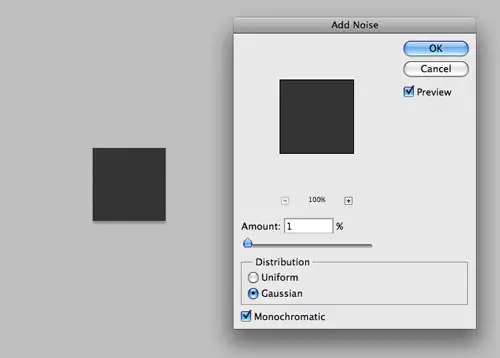
Start out by creating a simple background. In Photoshop create a 100x100px and fill with a dark grey. Add some texture using the Noise filter.

<!DOCTYPE html PUBLIC "-//W3C//DTD XHTML 1.0 Strict//EN" "http://www.w3.org/TR/xhtml1/DTD/xhtml1-strict.dtd">
<html xmlns="http://www.w3.org/1999/xhtml">
<head>
<meta http-equiv="Content-Type" content="text/html; charset=UTF-8" />
<title>Pure CSS Letterpress Effect</title>

<h1>Line25</h1>
<h2>Pure CSS Letterpress Effect</h2>


</head></html>

Set up a plain HTML document, then add a few lines of text to test the effect on.

body {
	background: #474747 url(bg.png);
}

h2 {
	font: 70px Tahoma, Helvetica, Arial, Sans-Serif;
	text-align: center;
}

Style up the text using the usual CSS properties to edit the size and basic appearance.
Text-Shadow CSS3 Property

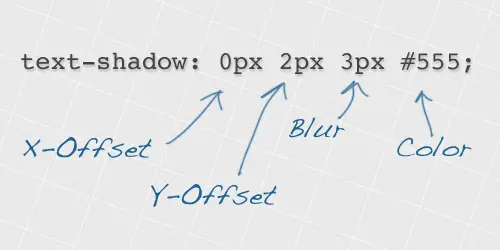
Now we’re ready to apply the text-shadow property. This works by specifying an x-offset, a y-offset, the shadow blurriness and the actual colour of the shadow.

color: #222;
text-shadow: 0px 2px 3px #555;

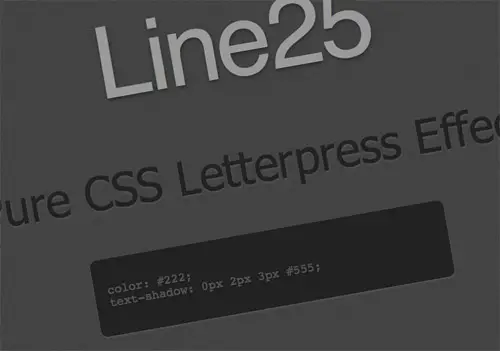
To create the letterpress effect, we need to add a shadow that’s lighter than the colour of the text to ensure the effect works correctly. Here we’re using #555555 against the darker #222222 text colour. A 2px vertical offset and very subtle blurriness helps give the exact appearance we’re after.
View the CSS letterpress effect demo

Simple! Check out the example to see it for yourself. Don’t forget, users with rubbish unsupporting browsers will only see the plain text, without the cool shadow awesomeness, so use it wisely.

View demo

Written by Chris Spooner

Chris Spooner is a designer who has a love for creativity and enjoys experimenting with various techniques in both print and web. Check out Chris' design tutorials and articles at Blog.SpoonGraphics or follow his daily findings on Twitter.

75 Comments

  1. saumya says:

    nice trick,just incorporated in one of my projects.Sudden improvement in UI :)
    thank you so much

  2. Bender says:

    Nice Trick. Thank you for sharing. Very useful.

  3. Great I was looking for this!

  4. mickel says:

    This is very nice and the letterpress effect is good. buy steroids online
    buy steroids online
    buy steroids online

  5. I was looking at this on a site the other day wondering how they achieved it, awesome as it works with the CMS.

    Amazing how these little touches make such a huge difference.

  6. hercival says:

    nice trick..
    but this letter press does not work with internet explorer…

  7. XTubes says:

    Change the rgba to .33 in the .blackbox and make the background color the same on both it looks exactly the same.

    Free porn tubes

  8. hasfa says:

    nice tutorial and trick. Thanks Guys.

  9. as says:

    not work internet explorer

  10. Gary says:

    just a note: the effect illustrated is known as relief or emboss printing. Letterpress (which I worked with for a few years in the 70′s is indistinguishable from any other printing unless magnified at least 5X. All magazines prior to the lithography boom around the early 70′s were printed letterpress. Get a magazine like Life or Time from the 60′s or before and compare the type under magnification to anything from the mid 70′s onward.

  11. Thank you very very much!!!!

    nice tutorial!!!!

  12. Useful toturial

    Thanks for this post

  13. Marius M. says:

    Thats a nice.
    Can I use the background of the example on my own page for free or under a creativecommons licenses?
    Greetings
    Marius

  14. Thanks for another great tutorial. Shame it isn’t supporting properly yet though…

  15. Will says:

    Really fine post.

    Thanks for sharing.

    Get more here.

    Design

  16. aimee says:

    In the example you are placing the h1 and h2 tags in the head and do not have a body.

  17. BigM75 says:

    thats the right way, more please, nice article

  18. Medspa MD says:

    Great tutorial. Nothing extraneous which is nice to see amidst a blizzard of content.

  19. Sendsider says:

    You can add this to the CSS but if it’s overdone, or added to smallish type it tends to lose it’s effect. Headlines are best use.

  20. wptidbits says:

    Oh my god. I never knew of this can happen only using simple CSS codes! Maybe now is the time to focus more on CSS codes rather than using plain images and combined it with CSS. Page load might reduce a lot!

  21. BInE says:

    It’s nice, but didn’t work in IE.

  22. Badger says:

    Thanks Chris, nice and simple and easy to follow. I know i’ll be using this in my designs from now on.

    Give us more like this.

    Thanks again.

  23. Crystal says:

    I was looking for something just like this the other day. Thanks so much for the detailed explanation/tutorial. I’ve been seeing this technique around and definitely see it as a growing trend!

Comments are now closed