Create a Letterpress Effect with CSS Text-Shadow

View the article

The letterpress effect is becoming hugely popular in web design, and with a couple of modern browsers now showing support for the text-shadow CSS3 property it’s now simple and easy to create the effect with pure CSS. No Photoshop trickery here!

Letterpress – Isn’t that a type of industrial print method? That’s right! But the effect has also made its way into web design. Check out the previous feature showcasing examples of how designers are using this cool ‘de-bossed’ look on designs across the web.

With the recent support of text-transform in Safari and Firefox (3.1+) the effect can easily be created without needing to use any image replacement techniques. This means your text is much easier to edit, and has the benefit of being rendered directly in the browser.
View demo

Create a simple background

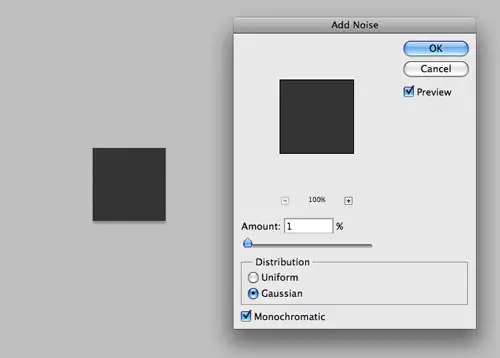
Start out by creating a simple background. In Photoshop create a 100x100px and fill with a dark grey. Add some texture using the Noise filter.

<!DOCTYPE html PUBLIC "-//W3C//DTD XHTML 1.0 Strict//EN" "http://www.w3.org/TR/xhtml1/DTD/xhtml1-strict.dtd">
<html xmlns="http://www.w3.org/1999/xhtml">
<head>
<meta http-equiv="Content-Type" content="text/html; charset=UTF-8" />
<title>Pure CSS Letterpress Effect</title>

<h1>Line25</h1>
<h2>Pure CSS Letterpress Effect</h2>


</head></html>

Set up a plain HTML document, then add a few lines of text to test the effect on.

body {
	background: #474747 url(bg.png);
}

h2 {
	font: 70px Tahoma, Helvetica, Arial, Sans-Serif;
	text-align: center;
}

Style up the text using the usual CSS properties to edit the size and basic appearance.
Text-Shadow CSS3 Property

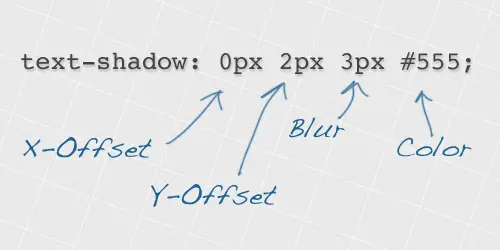
Now we’re ready to apply the text-shadow property. This works by specifying an x-offset, a y-offset, the shadow blurriness and the actual colour of the shadow.

color: #222;
text-shadow: 0px 2px 3px #555;

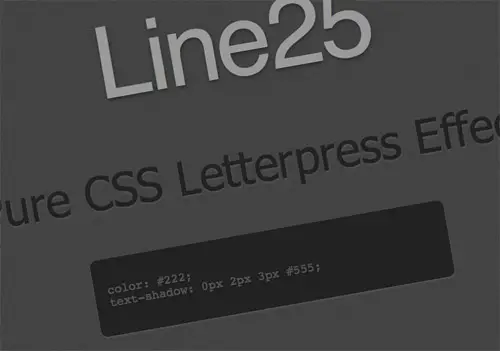
To create the letterpress effect, we need to add a shadow that’s lighter than the colour of the text to ensure the effect works correctly. Here we’re using #555555 against the darker #222222 text colour. A 2px vertical offset and very subtle blurriness helps give the exact appearance we’re after.
View the CSS letterpress effect demo

Simple! Check out the example to see it for yourself. Don’t forget, users with rubbish unsupporting browsers will only see the plain text, without the cool shadow awesomeness, so use it wisely.

View demo

Written by Chris Spooner

Chris Spooner is a designer who has a love for creativity and enjoys experimenting with various techniques in both print and web. Check out Chris' design tutorials and articles at Blog.SpoonGraphics or follow his daily findings on Twitter.

75 Comments

  1. om ipit says:

    great tips chris
    simple but useful

  2. I can’t wait for all browsers to implement CSS 3. It will make so many things so much easier for us.

    I personally refuse already IE 6-Support for my portfolio web site, the users get redirected to a page with alternatives to IE 6.

  3. choen says:

    how about ‘@font-face CSS embedding’

  4. Great tut! Dugg, Tweeted and Bumped!

  5. leandra says:

    This is a great visual effect and I can already think of a spot where a client would love it. Thanks for the post!

  6. Ben says:

    awesome! nice work mate

  7. Hmmm, I’m using the latest version of Firefox. Is it one of the rubbish unsupported browsers? It seems that I can’t really view the example page, at least I can’t see the effect.

  8. Enk. says:

    Wow, Cool.
    It works well on Firefox but its showing simple text in Flock and Internet Explorer

  9. web2000 says:

    Hey nice easy effect here. I just wanted to share what it could look like in Internet Explorer (and firefox) using 2 absolute position spans – http://dealfreezer.com/demo34_pure_css_letterpress_ie.html – thanks!

  10. Wow, it’s brilliant! Reaaly really handy. Thanks for sharing. Cheers.

  11. I understand so that does’t work on IE

  12. Strange… I’m not seeing it on Mozilla 3.0.13
    But i get the idea

  13. Another cool css3 feature! Wish most browser vendors support css3..

  14. Something I played with is using an rgba color so that you don’t have to customize the text-shadow for every style you want to use it on. Also helps if you have varying background colors.

  15. DAI Media says:

    Wooow, verry beatifull feature of css.
    Thx for sharing.

    Regards from Spain

  16. D says:

    No idea why we’re calling this the letterpress effect. Good letterpress doesn’t smash the hell out of the paper. What’s wrong with calling it what we’ve always called it: Debossed.

  17. TutsKing says:

    I clicked b/c I’m awesome. ;) It was worth it. :)
    I think a few people have called it Letterpress and it pretty much spread without anyone blinking an eye. . .

  18. Barrett says:

    I mean this is a great effect, is it really that hard for people to upgrade their browsers? I mean come on! Thanks!

  19. studdude says:

    splendid effect, but It’s no soon all users will be able to experience this one, unfortunately…

  20. That is a lovely effect. I was wondering what the reason for creating the grey background was, I can see many other uses for this. Cheers!

  21. Hey Chris,

    thanks for that innovative article. Bookmarked for letterpress effects!

  22. joel k says:

    wow
    web designer depot linked me to this page
    thanks 4 sharing this amazing effect

  23. Dmitry says:

    Cool effect! Very nice!

  24. Marco says:

    Many thanks, I used it on my e107 site on the titles and even on the navbar.

  25. Daniel Due says:

    Very nice, gonna try it out right away ;)
    BTW.!! I belive that all of us are gonna love when IE6 is left outta here.. :D I to, leave ppl with a message, telling them to upgrade from IE6.

    Anyways, keep em comming :)

  26. Daniel Due says:

    Hmm, cant seem to make this work, whats the browser support? you mention Firefox, but ive tested it in this? even firebugged your demo.. but tried on a white bg?

  27. Nice work. I would suggest that the following code produces a bit of a cleaner efffect:

    text-shadow:1px 1px 1px #555555;

  28. Sahan says:

    Hi,
    The press effect successfully shown in IE & FF, but not in chrome. (Chrome shows a text with a drop shadow) However recently I updated the FF and now it’s also showing a text with drop shadow ?

  29. TeresaLiu says:

    Thanks for the tut, it’s help, i see it on google chrome, perfect performance.

  30. manjeet says:

    cool effect but not work on IE6

  31. cool effect!
    but does’t work on IE

  32. Great post! Linked to from my web design blog on how to use css text shadow to create letterpress effect.

  33. Jason says:

    awesome, look forward to using that.

  34. Kai says:

    damn nice effect. thanks for your post.
    a shame it doesnt work in IE

  35. Very nice Chris. Will be using this in my next web project.

  36. Yousuf says:

    Neat stuff!!!

  37. bharat says:

    VERY NICE NEAT STUFF ;) KEEP ROCKING

  38. Hi,

    I would like to achieve the same effect but with a ghostwhite (#F8F8FF) background. Could you help me with the code, I tried hours with no luck?

    Thank you.

  39. Imran Khan says:

    I this a nice tutorial but this isn’t working in IE 6 ,

    actually i would say ie 6 sucks..

  40. alex says:

    Is a good tutorial, this work in IE8,

    visit my web http://www.onlycatsanddogs.com

  41. sanakan says:

    a, a * {
    color: #1456a5;
    text-decoration: none;
    }
    a:hover, a:hover * {
    color: #39f;
    text-shadow: 0 0 3px #1456a5;

    Another cool shadow at http://raphaeljs.com/
    just a few number changed.

  42. Dhirendra says:

    Good Post.

    But it doesn’t work on IE 6.

  43. jaycee says:

    thank you so much♥ check my blog :)

Comments are now closed