Line25

10 Usability Crimes You Really Shouldn’t Commit

Read the full post

Over time certain conventions and best practices have been developed to help improve the general usability of websites during their design and build. This roundup of ten usability crimes highlights some of the most common mistakes or overlooked areas in web design and provides an alternative solution to help enhance the usability of your website.

Crime 1: Form labels that aren’t associated to form input fields
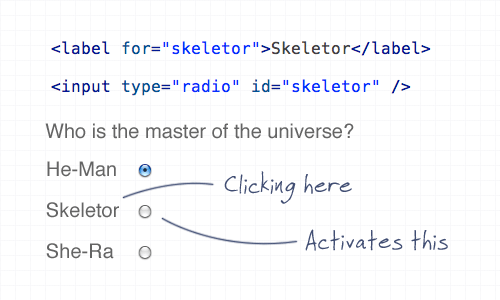
Using the ‘for’ attribute allows the user to click the label to select the appropriate input fields within a form. This is especially important for checkboxes and radio fields to give a larger clickable area, but it’s good practice all round.

Crime 2: A logo that doesn’t link to the homepage
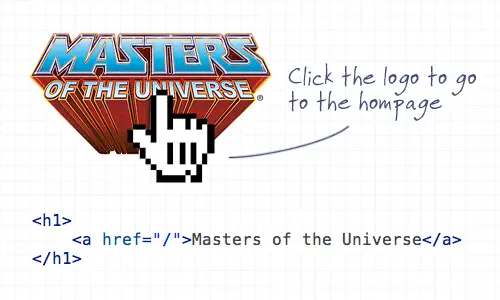
Linking the logo of a website to the homepage has become common practice and is now second nature for (most) web surfers to expect the logo to head back home. It’s also worth mentioning the logo should appear in the top left.

Crime 3: Not specifying a visited link state
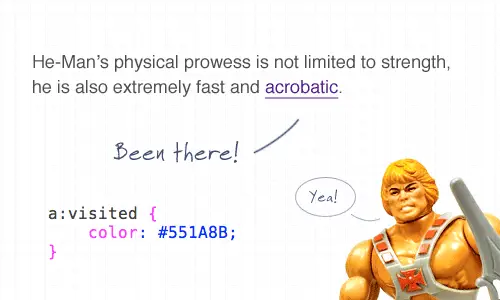
Visited link states do exactly as they say on the tin. It’s not the most advanced CSS selector, but it’s one that is often overlooked. Give users a visual clue as to which link has already been clicked.

Crime 4: Not indicating an active form field
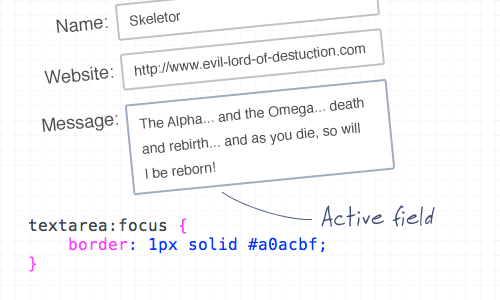
You can use the ‘:focus’ selector on lots of elements, but it’s super handy when used on inputs and textareas to indicate that the field is active. Add CSS styling such as a highlighted border, or a subtle change to the background color.

Crime 5: An image without an alt description
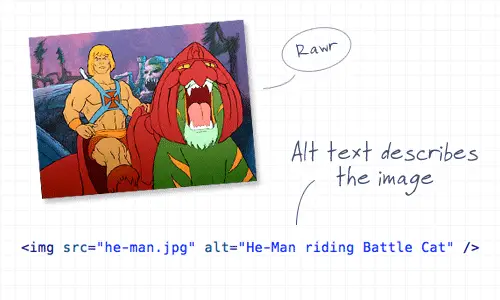
This is straying a little into the realm of accessibility, but it’s still an important consideration! Remember to always add a descriptive alt attribute to your images, unless of course they are used for decorative purposes, then the ALT attribute can be left empty (but should still exist!). When using an image as a link, enter a description of where the link goes.

Crime 6: A background image without a background color
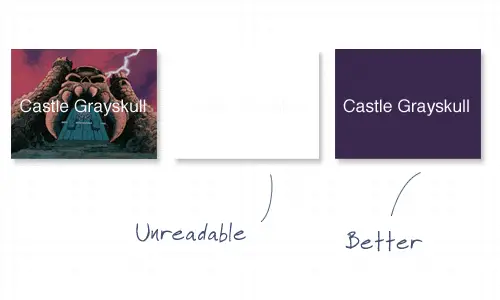
It’s common to use background images behind passages of text, but it’s worth remembering that if background images are disabled by the user, there needs to be a similar tone in the form of a background colour to avoid the text becoming unreadable.

Crime 7: Using long boring passages of content
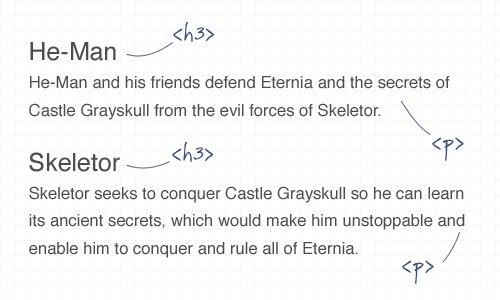
There’s nothing more off-putting than landing on a webpage that’s laid out as a continuous passage of text. Break up your content with images, headings and clear sections to make it easier to scan, read and digest.

Crime 8: Underlining stuff that isn’t a link
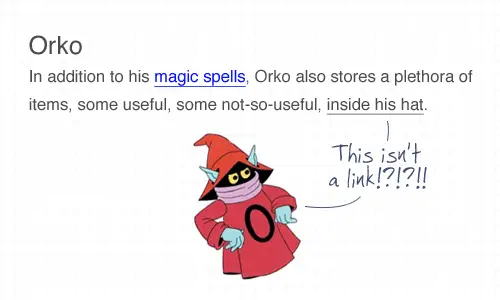
Everyone knows that text that’s underlined, or is a different colour is likely to be a link. Don’t go confusing people by throwing in underlined text elsewhere! To draw attention to a certain word, try using the strong or emphasize tags instead.

Crime 9: Telling people to click here
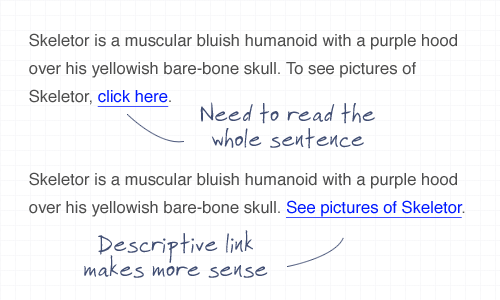
The words click here have been around since the dawn of the Internet, but have been shunned aside in favour of more usable options. Using the words click here requires the user to read the whole sentence to find out what’s going to happen. Instead, describe what’s going to happen in the actual anchor link text.

Crime 10: Using justified text
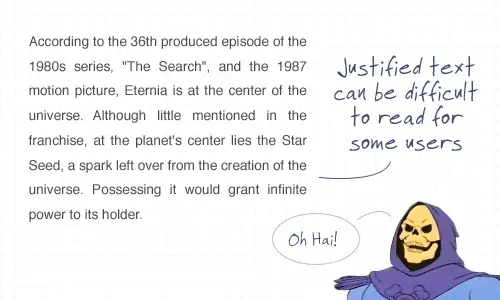
This is another tip that’s heading a little deeper into accessibility but is also an important point to consider. Justified text might look at neat and square to the eye, but it can generate some real readability problems, particularly for Dyslexic users who can find it troublesome to identify words due to the uneven spacing of justified paragraphs.

Subscribe by Email

Don't miss an update! Have new content delivered straight to your inbox.

Written by Chris Spooner

Chris Spooner is a designer who loves experimenting with new web design techniques collating creative website designs. Check out Chris' design tutorials and articles at Blog.SpoonGraphics or follow his daily findings on Twitter.

244 Comments

  1. Justin says:

    Nice one. I’ve regularly broken two of these, mostly due to laziness. Time to shape up, I think.

    As to the justified text issue, this is a sore point I have with browser rendering. In print, Justified text is the most legible form of column text, because the spacing between words is kept regular by calculating justification over the whole paragraph, not a single line.

    Browser implementations never really ‘got’ how justification works, and all current CSS implementations calculate justification on a line-by-line basis, which is why we get the stupid irregular word spacings. It’s less legible for everyone, not just the dyslexic.

  2. ArleyM says:

    Nice post.

    Re: #9: Though I agree completely; A/B tests have shown that the text “click here” does result in more click-throughs.

    Sometimes your audience has to be told.

    • Richard E says:

      I tend to use the words “click here” because of their higher clickthrough rate, but I use them as part of a sentence that describes what happens if you do, the whole phrase being the link, eg “Click here to see pictures of Skeletor”.

      Great post overall: I knew most of these but I’ve broken them enough times to need a reminder.

    • Do you have a reference to those A/B tests? I suspect they’re testing marketing tactics rather than usability.

  3. Stevie Benge says:

    The one I always overlook is the for=”" attribute on tags. This was a friendly reminder that I should pay closer attention to this, er “crime. :)

  4. Sub says:

    Very similar to the FOWD tour ‘do not’s’ lol

  5. Justin says:

    Nice post. I don’t even want to link to my blog because it commits a few of these crimes!

    Usability is very overlooked

  6. Jeremy says:

    With regards to #6, it is often technically infeasible to implement that when transparent background images are involved.

    This is because the browser always renders the background colour, even when the background image is available.

    This has advantages and disadvantages (e.g. one advantage is that it can make gradients easier to code), but is honestly something that is basically impossible to fix where transparency is involved.

  7. Justin Ryan says:

    To reiterate ArleyM:
    People respond to being told what to do.
    http://dustincurtis.com/you_should_follow_me_on_twitter.html

  8. Melissa says:

    Excellent reminders – I know I’ve broken a few of these rules. Clients argue with me about the visited link though. They want all links the same color no matter what.

  9. gm says:

    thanks! using he-man for examples makes me feel like IIII Haaaaaave the Poooooweeer! to improve usability

    /sorry
    /great post

  10. ak says:

    @ArleyM
    I agree as well, this should qualify as a bandwagon by now. Yet I’ve come to the loathe “click me” links – mainly because most owe their existence to nothing as sophisticated as click-through rates and hence do constitute a usability crime…

    It’s probably helpful to err on the healthy side of usability and readability unless provoked – while teasers and the like are explicitly designed to generate a click, inline links are a contextual part of the content and in most cases do not require special attention – the need to follow a link will arise on its own, for each user. At that point, content should be content, not navigation, unless needed. “Mission accomplished, properly phrased inline link.”

    I think the urge to generate clicks is valid and so is using “click here” in conjunction with a concise description (the “See pictures of Skeletor” above). As for the content itself, I try to exempt it from such calculation as not to degrade its value (inline Google Ads w/Flash can make article readability an actual issue). This should also be the safer bet regarding users who only get to hear the text.

    If the site/content/client requires inline links to be tuned for click-throughs, suitable compromises can be found in e.g.

    - appropriate iconography (don’t break the line-height, don’t punish the user for innocent hovering – I’m talking to you, annoying popup-preview-thumbnail-dictionary-toaster-thingies)

    - seductive associated/related links sections (with all the amenities teasers can provide). Extract the associated links dynamically and you might not even have to start worrying about duplicate content and such.

    - mmh… there must be more than two ways to do this while leaving the content in a sane state, right?

  11. Tommy says:

    I’m a culprit for using justified text, but no longer! Thanks for the awesome article!

    Ps – I loved the use of He-man, very nice touch.

  12. neojohan says:

    I’m a CSS/Web programmer and already been arrested a couple of times with those crime in the past. Hehe… Now I’m completely clean. Thanks for the tips.

  13. Oliver says:

    Wow I never knew that I committed a crime how lucky to have this tips.

  14. Leonard says:

    Here’s one: avoid the crime of putting radio buttons to the right of their labels.

  15. I will add another… not showing what page you are on with in your nav links. Not that much extra work to do.

    Happily I think I follow all of your suggestions (though I have been guilty of full justify from time to time).

  16. Excellent reminders. Thanks dude!

  17. AndrewNoNumbers says:

    Nice to know I’ve been following every single one!

  18. That’s simply great Chris, some times we forget this things intentionally or unintentionally. Articles reminds a website should be ‘pixel perfect’

  19. Like ArleyM, I’ve noticed that my users click more when I told them to do so.
    So sometimes I use a mix of usability and click rate :
    Click here to…

  20. chaitrax says:

    nice article, ..:)

  21. Kim says:

    Thank you for this excellent article! Hope, it helps a lot of webmasters and -designers to do their work in a useful way :-)

  22. Nice one. Some of my biggest peeves are 1, 2, 8 and 9.

    I have to say though, #6 is not always a possibility when you have images with transparency, especially on the alpha layer, but in general, it’s a good practice.

  23. Heidi DeVries says:

    While I wish we didn’t have to, “click here” is necessary for a lot of Web sites – they generate more clickthroughs and, therefore, makes the link more “usable.” Despite what people who use the Internet constantly think, most newspaper readers, for example, don’t know that underlined blue text is a link. They need that written indicator.

  24. Jason says:

    There is no immutable law regarding the use of justified text. Depending on the context, it can be a good solution.

  25. Rick says:

    Whoa good list. I am pretty happy that I try to avoid most of these except #6. I will have to work on that

  26. eddie says:

    it’s really useful.thank you for these tips

  27. Very good. Images added an extra value. Please write more :)

  28. Veera says:

    Informative.

    Well, I can’t justify the ‘Justified text’ point anyway. Because with justified, the paragraphs looks neat and professional.

  29. Willian says:

    Nossa muito legal as dicas, parabéns por elas, eu aqui no Brasil estou aprendendo coisas novas, rsss…

    Good “dicas”, very good article!

  30. Chris says:

    That was a great article. Some times the simple things go the furthest!

  31. Michael says:

    How can you write an article like this telling other people what not to do, sorry crimes they should not commit, when you are doing the exact opposite on your site.
    There is no justification for it.
    Thats like saying, you know, you shouldn’t steal. But it’s okay if it’s from rich people as they wont’t notice.
    FAIL

    • Wiz says:

      Other than not having alt tags filled out on the 10 images in this post, what other things are being done *exactly the opposite* on this site, because I see none.

      Maybe before talking shit to someone trying to offer help and advice, you should realize what you are saying. Have you ever noticed how shitty of a website you have? If I could rate your site vs. this site, you would get a 0. Poor layout, poor typography, poor, images, poor coding skills, poor you. Your pathetic site probably doesn’t even get 10 hits/day, yet you come to this blog to talk like you know what’s right and whats wrong.

      How can you write a comment like yours telling other people what they shouldn’t write about when you don’t even know how to structure sentences properly?

      Grow up and stop trying to sound like a cool kid by talking down to someone who is obviously better than you at life. Using the term “FAIL” to describe how you feel this article written makes you look like a 12 year old pre-pubescent little girl. Stop whining and bitching and being rude to someone who is trying to help. Your pathetic attempts to bring humor into your derogatory statements didn’t prove a thing. He did not fail, as this site is successful, and has a large following. You on the other hand have succeed at not only looking like a douche bag in your picture, but also coming off as a complete dumb ass to anyone who reads this article in the future.

      Perhaps the ADULT thing to do would have been to say, “Hey Chris, I noticed that you forgot to fill in your alt tags on the images in this post. I just thought I’d shoot ya a line so you could fix it! Have a great day!”

      • Michael says:

        Oh how I love flame wars.

      • Michael says:

        You probably right you know.
        Having a shitty day doesn’t mean that you should write a a shitty comment on someones blog. So sorry for that Chris. Will be more friendly next time.
        But hey ho, freedom of speech and all that.
        Muchos love amigos.

      • ak says:

        Way too broad a brush…

        I agree with you, but looking at his site I think you are out of line, much like he was before.

        The linked site gets an average YSlow rating, has decent markup and CSS, uses Javascript appropriately and works without it. Design is contemporary run-of-the-mill stuff, the logo doesn’t fit visually, the portfolio is pretty non-descript, and the copy reiterates your point about 12-year-old-minds at work.
        One huge usability blunder: you won’t get anywhere without a mouse – link outlines are hidden so you cannot see the link you just tabbed to.

        In summary, balk at the kid for misbehaving, but don’t diss the skills without proof. Glass houses. Let’s all think of where we are and where we came from.

        You may, however, hone in on how bad his analogy was. “Stealing from rich people?” Come. On.

        Finally, use your expletives wisely. And sparingly. You’ll last longer.

        • ak says:

          Though I failed to properly indicate so, this is obviously a reply @Wiz, who has not graced us with a link to his/her site…

  32. TheBigO says:

    A great way way of highlighting why not to use ‘click here’. Never though of the argument for the links losing context when scanning a document.

    If you’ve included the visited link – which I think many clients hate and is a battle that is easily lost unless the site is your own – I would like to add: Use a focus state on navigation links so that users without a mouse know which link is currently active when they tab through the document.

  33. Allen P. says:

    Eye-opening. I really appreciated this article. Thanks!

  34. John says:

    Although this is a nice list, I don’t agree with all the items.

    - Why would I have to have my logo on the top left? Although a lot has been said about the F-style of reading content, that doesn’t mean that in some designs a logo on the right-top, left-bottom or right-bottom wouldn’t work well.

    - ‘Click here’ can work very well sometimes. I’m not saying everybody should change all their link-texts to ‘click here’, but in some cases it’s fine.

    - Justified text can work pretty well, for example if you present content in multiple columns. Newspapers and magazines have done this for years. The trick is to not overdo it.

    I would like to add a crime to the list though, although it doesn’t really have to do with usability:

    - If you’re claiming to be a designer with original ideas, NEVER make a webpage that starts with ‘Hello, I am [name here]. I design webpages’ or something similar. It has been over-used, and should be considered very un-original…

  35. John says:

    Oh and another one that you forgot: I think all anchor tags should have a title attribute.

  36. Alek Davis says:

    I plead guilty to crimes #1, #4, #6, and #10.

  37. Martin says:

    The tips are great, and really helpful, but linking each of the illustrations and demo images in a theme with He-Man was just inspired, and brought a welcome spark of humor to your message!

  38. Neil says:

    I’m surprised nobody has argued against “separate style for visited links” yet.

    I see this all the time and have no problem with keeping the css for unvisited and visited links the same. (Note also that this site also appears to commit this “crime”) =D

    This guideline, as with most others in web design, can be bent or broken depending on the situation and specific site.

  39. JONxBLAZE says:

    Awesome tips..love the He-Man approach!

  40. I’m a little confused as to why FF uses the Title Tag for tooltips, but IE uses the alt tag, according to W3C the Alt tag is the correct one to use, but IE usually breaks standards and FF complies with them. If Alt is purely for providing alternative text rather than a tooltip then I guess that’s the answer.

    • Alistair says:

      I haven’t checked on the W3C, but I was under the impression that the Alt attribute was for alternative text, to be shown when the image isn’t, and that it was co-opted by IE for tooltips. It’s the Title attribute that was meant for tooltips.

      Me, I’m certainly guilty of Crime 3, not specifying a visited link state. But surely this is something that, if it’s useful at all, would be especially useful in the main navigation of a site, and that’s where you never see it, because it can easily make things look messy and confusing.

  41. Gyorgy says:

    You forgot to mention javascript links.

    Oh, man I can’t believe how many developers still using this technique. Just stop it!

  42. aaandrea says:

    a small step for a programmer a giant leap for the mankind

  43. Luke says:

    I wouldn’t call these crimes, exactly… more along the lines of “10 Things That Don’t Meet Someone’s Definition of Best Practice.”

    Much bigger usability crimes include:

    - Questionable use of color contrast, for example, coloring text and putting it against a colored background. Arbitrarily.

    - Unreasonaby difficult CAPTCHA code images.

    - Hosting CPU-intense content, such as embedded media in some proprietary format requiring plugins that aren’t Flash.

    - Bratty flying DHTML advertisement windows that you can’t close until they stop flying sideways.

    - User interfaces that are a mirror image of their data source; i.e., a GIANT table with ten thousand records and way too many columns that people may not even be able to edit.

    - Robot-code-speak error message text and descriptive text: ”

    - Left-to-right scrolling pages. Those make everyone angry.

    - Fault-intolerant web publishing scripts that let hapless boobs post huge ugly text and page-exploding images that are 3000 pixels wide.

    - Crappy legacy forum navigation that makes you drill, drill, drill to get to anything and then read backwards.

    - Small text in non-device fonts. I’m going blind just thinking about it.

    For the record, “CLICK HERE” is an unequivocal call to action. Every page selling something needs one. This is a research-supported fact. Think of your aging parents who ask you questions like “Why does my Internet sometimes go away?”

  44. de ce? says:

    oh, yea. don’t forget alt and :visited

  45. keogh says:

    I liked your post, good job, thanks for the tips

  46. jase says:

    Thanks for the fourth tip about form fields. I was guilty!

    I found that for my form, 2px worked better than 1px, and Chrome and Safari have their own form highlighters.

  47. Nice share :) yeah i total agree about this list not sure about the status of the “Read more” Link but a fair solution is to describe the action on the title=”" and i agree that some times people need a direction.

    and thanks for reminding me in the Radio Button crime :) i’ve been busted LOL

  48. valeriano says:

    Wow! The 10th hint is something I never knew nothing about! One would think in terms of usability for people having other kind of problems than dyslexia! You gave us a good hint not only for web design!

  49. Tuan Jinn says:

    Nice article. :D
    There is one thing that should be aware of is:
    crime #5: dont use alt, it wont work for firefox or some other browsers, if possible use title and alt (title) should be enough

  50. kersjous says:

    #10 – this is mark of our time – more and more illiterates… like someone said before – newspapers have used justify for decades.

Comments are now closed